This is default featured slide 1 title

Go to Blogger edit html and find these sentences.Now replace these sentences with your own descriptions.

This is default featured slide 2 title

Go to Blogger edit html and find these sentences.Now replace these sentences with your own descriptions.

This is default featured slide 3 title

Go to Blogger edit html and find these sentences.Now replace these sentences with your own descriptions.

This is default featured slide 4 title

Go to Blogger edit html and find these sentences.Now replace these sentences with your own descriptions.

This is default featured slide 5 title

Go to Blogger edit html and find these sentences.Now replace these sentences with your own descriptions.

Showing posts with label Perl. Show all posts

ansvif - An Advanced Fuzzing Framework Designed To Find Vulnerabilities In C/C++ Code.


ansvif, written primarily in C++, is designed to find code bugs by throwing garbage input at programs to see how they react. This is great for finding bugs, because not every type of input is always handled, and buffers are not always checked, etc. It also comes in handy when writing (and protecting against), buffer overflow exploitation, as well as string input validation vulnerabilities (the %s bug).

Dependancies:
automake autoconf-archive zlib1g-dev libcrypto++ g++ gcc

Compliation:
Linux:
$ aclocal && autoconf && automake -a && ./configure && make

Or, if you would like to play with the syscall fuzzer:

$ aclocal && autoconf && automake -a && ./configure --enable-syscalls && make

OpenBSD:
$ AUTOMAKE_VERSION=`ls /usr/local/bin/automake-* | head -n 1 | sed -e 's/.*-//'`\
AUTOCONF_VERSION=`ls /usr/local/bin/autoconf-* | head -n 1 | sed -e 's/.*-//'`\
aclocal && AUTOMAKE_VERSION=`ls /usr/local/bin/automake-* | head -n 1 | sed -e 's/.*-//'`\
AUTOCONF_VERSION=`ls /usr/local/bin/autoconf-* | head -n 1 | sed -e 's/.*-//'`\
autoconf && AUTOMAKE_VERSION=`ls /usr/local/bin/automake-* | head -n 1 | sed -e 's/.*-//'`\
AUTOCONF_VERSION=`ls /usr/local/bin/autoconf-* | head -n 1 | sed -e 's/.*-//'` automake -a\
&& CXX=eg++ ./configure && make
Windows:
Windows binaries are now desgined to be compiled with MinGW-W64 (since we use threading download a version of MinGW-W64 g++ with seh).
(Go to where you installed MinGW-W64 and click mingw-64.bat)
g++.exe src/common.cpp src/win/bin2hex.cpp src/win/bin2hex_pc.cpp src/win/popen2.cpp src/win/main.cpp src/win/help.cpp src/match_seg.cpp src/win/sys_string.cpp src/win/sys_string_pc.cpp src/win/man_read.cpp src/randomizer.cpp src/trash.cpp -I./ -I./include -std=c++11 -lstdc++ -lpthread -O2 -o ansvif.exe -static -static-libgcc -static-libstdc++
gcc src/win/printf.c -o printf.exe
Note: cygwin .dll external files are no longer required as we now compile with g++ from MinGW. In Windows 7 Powershell v2 is installed by default, however, this program requires atleast Powershell v5. Windows 10 includes powershell v5. You can go to Microsoft's site and download the Windows Management Framework (which includes newer Versions of Powershell here:
https://www.microsoft.com/en-us/download/details.aspx?id=50395

Testing:
If you would like to try out the example code, you can compile faulty.c with:
$ gcc faulty.c -o faulty
Using the example code: You can point the memory back at address \xff\x05\x40\x00\x00\x00\x00\x00 (the subroutine containing the code that spawns bash) with: $ ./faulty -a $(perl -e 'print "A"x24;print "\x00\xff\x05\x40\x00\x00\x00\x00\x00"') The address may be a little different under your distro, check gdb if you really want to try it out. The code above /should/ drop you at a bash prompt. If the code is set to a mode where all are able to execute as another user, it will attempt to spawn a root shell. or simply run make test .

Usage:
Important note: Windows users will have to run ansvif.exe from Powershell for it to work!
$ ./find_suid /usr/bin/ /bin/ /sbin/
$ ./ansvif -[tm] [template/manpage] -c /path/to/executable -b buffersize

Examples:
Linux/BSD:
$ echo "Marshall" ./ansvif -t examples/template -c ./faulty -b 64
$ ./ansvif -m mount -c /bin/mount -e examples/mount_e.txt -x examples/mount_o.txt\
-f 8 -b 2048
$ ./ansvif -t examples/blank.txt -F tmp/tmphtml -x examples/htmltags.txt -c /usr/bin/iceweasel -b\
128 -A "file:///home/username/src/ansvif/tmp/tmphtml" -f 2 -n -R "sleep 3 && killall\
iceweasel" -S ">"
$ cat examples/linux_syscalls_implemented.list | xargs -P \
`cat examples/linux_syscalls_implemented.list | wc -l` -I {calls} ./ansvif -t examples/space.txt \
-B "{calls} " -c ./syscalls -o syscall_crash -f 1 -z -d -b 16
Windows:
PS C:\ansvif\bin\ansvif_win> .\ansvif -t ..\..\examples\space -F ..\..\tmp\tmphtml -x `
..\..\examples\htmltags -c `
'C:\Program Files (x86)\Google\Chrome\Application\chrome.exe' `
-b 128 -A "file:///C:\\Users\marsh\OneDrive\Documents\Code\ansvif\tmp\tmphtml" `
-f 2 -n -S ">" -R "sleep 2 ; Stop-Process -Name chrome"

Options:
  -t This file should hold line by line command arguments as shown in the example file.
-e This file should hold line by line environment variables as shown in the example
file. You can usually get these by doing something like:
$ strings /bin/mount | perl -ne 'print if /[A-Z]=$/' > mount_envs
-c Specifies the command path.
-p Specifies the manpage location (as an integer, usually 1 or 8)
-m Specifies the commands manpage.
-D Dumps whats found in the manpage.
-f Number of threads to use. Default is 2.
-b Specifies the buffer size to fuzz with. 256-2048 Is usually sufficient.
-r Uses only random garbage data.
-o Writes output to log file.
-z Randomize the buffer size from 1 to what is specified by -b.
-x Other junk to put in. Usernames and such can go here.
-S Seperator between options.
-s Omitted character specification. Defaults are <>\\n |&\[]\()\{}:;\ and newline is mandatory.
-T Timeout for threads.
-W Timeout for threads.
-L Unpriviledged user to run as if root.
-A Always put whats after this after command to run.
-B Always put whats after this before the command to run.
-F File to feed into the program that -x along with normal fuzzing data will be put in.
-n Never use random data in the fuzz.
-R Run this command after each fuzz.
-C A Non standard error code to detect.
-V Use Valgrind if installed.
-1 Try to make it fault once, if it doesn't happen, throw error code 64. Useful for scripting.
-P Use % to represent binary in fuzz.
-M Max arguments to use in the fuzz.
-y Short for -b 0 and usually only useful with -A or -B
-K Keep fuzzing after a crash in the target.
-v Verbose.
-d Debug data.
-h Shows the help page.

Recommendations: It is recommended that if you are doing long fuzzes or file fuzzing, if possible put the files (including the binary you are fuzzing if possible) in memory. This means, put them somewhere like /var/run/shm where disk thrash will be minimal, and fuzzing will be somewhat faster, especially if large files are being handled. Be warned however: You will lose your fuzzed files if they are in shm and you reboot the machine!

DO NOT RUN THIS CODE IN A PRODUCTION ENVIRONMENT! If you try setting faulty.c's output to suid(0) then PLEASE do it in a virtual machine. or atleast a machine that you don't care about. Other than that, just play around and have fun!

Notes:
Windows users must have ansvif running from Powershell. Linux and Windows code should be relatively stable. Syscall fuzzing under linux is under heavy development.

Bing Dork Scanner - Tool to extract urls from a bing search


This is a simple script with GUI, to extract urls from a bing search.

Support only HTTP proxy.

Required Perl Modules:
  • LWP
  • Gtk2
  • Glib
  • uft8
  • threads
  • threads::shared
  • URI::Escape

Egresser - Tool to Enumerate Outbound Firewall Rules


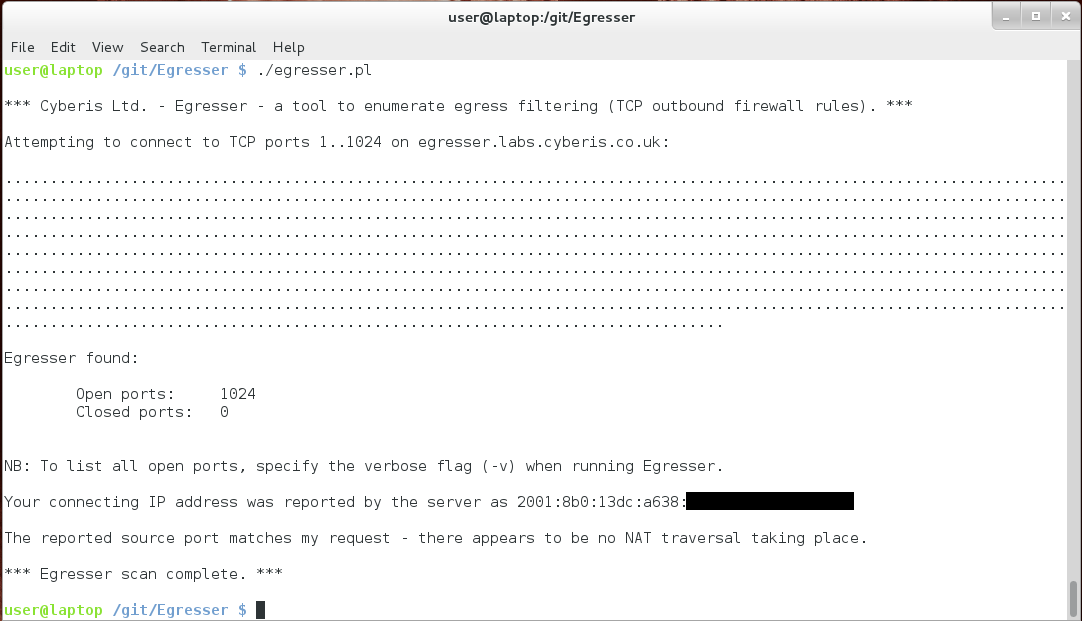
Egresser is a tool to enumerate outbound firewall rules, designed for penetration testers to assess whether egress filtering is adequate from within a corporate network. Probing each TCP port in turn, the Egresser server will respond with the client’s source IP address and port, allowing the client to determine whether or not the outbound port is permitted (both on IPv4 and IPv6) and to assess whether NAT traversal is likely to be taking place.

How it Works
The server-side script works in combination with Iptables - redirecting all TCP traffic to port 8080 where the ‘real’ server resides. The server-side script is written in Perl and is a pre-forking server utilising Net::Server::Prefork, listening on both IPv4 and IPv6 if available. Any TCP connection results in a simple response containing a null terminated string made up of the connecting client’s IP and port. Feel free to use Telnet to interact with the service if you are in a restricted environment without access to the Egresser client (our Egresser server can be found at egresser.labs.cyberis.co.uk, which you are free to use for legitimate purposes).

The client is also written in Perl and is threaded for speed. By default it will scan TCP ports 1-1024, although this is configurable within the script. It is possible to force IPv4 with the ‘-4’ command line argument, or IPv6 with ‘-6’; by default it will choose the protocol preferred by your operating system. If you want to explicitly list all open/closed ports, specify the verbose flag (-v), as normal output is a concise summary of permitted ports only.

Why?
It is recommended that outbound firewall rules are restricted within corporate environments to ensure perimeter controls are not easily circumvented. For example, inadequate egress filtering within an organisation would allow a malicious user to trivially bypass a web proxy providing filtering/AV/logging simply by changing a browser’s connection settings. Many other examples also exist - many worms spread over SMB protocols, malware can use numerous channels to exfiltrate data, and potentially unauthorised software (e.g. torrent/P2P file sharing) can freely operate, wasting corporate resources and significantly increasing the likelihood of malicious code being introduced into the environment.

Generally, it is recommended that all outbound protocols should be restricted, allowing exceptions from specific hosts on a case-by-case basis. Web browsing should be conducted via dedicated web proxies only, with any attempted direct connections logged by the perimeter firewall and investigated as necessary.

Egresser is a simple to use tool to allow a penetration tester to quickly enumerate allowed ports within a corporate environment.


Moscrack v2.08b - Multifarious On-demand Systems Cracker (cracking WPA keys in parallel on a group of computers)


Moscrack is a perl application designed to facilitate cracking WPA keys in parallel on a group of computers.

This is accomplished by use of either Mosix clustering software, SSH or RSH access to a number of nodes.

With Moscrack's new plugin framework, hash cracking has become possible. SHA256/512, DES, MD5 and *Blowfish Unix password hashes can all be processed with the Dehasher Moscrack plugin.

Some of Moscrack's features:

  • Basic API allows remote monitoring
  • Automatic and dynamic configuration of nodes
  • Live CD/USB enables boot and forget dynamic node configuration
  • Can be extended by use of plugins
  • Uses aircrack-ng (including 1.2 Beta) by default
  • CUDA/OpenCL support via Pyrit plugin
  • CUDA support via aircrack-ng-cuda (untested)
  • Does not require an agent/daemon on nodes
  • Can crack/compare SHA256/512, DES, MD5 and blowfish hashes via Dehasher plugin
  • Checkpoint and resume
  • Easily supports a large number of nodes
  • Desgined to run for long periods of time
  • Doesn't exit on errors/failures when possible
  • Supports mixed OS/protocol configurations
  • Supports SSH, RSH, Mosix for node connectivity
  • Effectively handles mixed fast and slow nodes or links
  • Architecture independent
  • Supports Mosix clustering software
  • Supports all popular operating systems as processing nodes
  • Node prioritization based on speed
  • Nodes can be added/removed/modified while Moscrack is running
  • Failed/bad node throttling
  • Hung node detection
  • Reprocessing of data on error
  • Automatic performance analysis and tuning
  • Intercepts INT and TERM signals for clean handling
  • Very verbose, doesn't hide anything, logs agressively
  • Includes a "top" like status viewer
  • Includes CGI web status viewer
  • Includes an optional basic X11 GUI


Compatibility

Moscrack itself should work with any Un*x variant, but it is developed and tested on Linux.

Tested platforms for SSH based end nodes:

  • Moscrack Live CD (SUSE)
  • Ubuntu Linux 12.10 x86 64bit
  • Ubuntu Linux 12.04.2 x86 64bit
  • Ubuntu Linux 10.10 x86 64bit
  • Ubuntu Linux 10.10 x86 32bit
  • CentOS Linux 5.5 x86 32bit
  • FreeBSD 8.1 x86 64bit
  • Windows Vista Business 64bit w/Cygwin 1.7.7-1
  • Windows Vista Business 64bit w/Cygwin 1.7.9
  • Mac OS X 10.5.6 (iPC OSx86)
  • Solaris Express 11 x64
  • iPhone 3g iOS 3.2.1 (Jailbroken)
  • Samsung Galaxy S2 SGH-I727R (Cyanogenmod 10 + Linux chroot)

Tested platforms for RSH based end nodes:

  • Ubuntu Linux 10.10 x86 64bit
  • Windows Vista Business 64bit w/Cygwin 1.7.7-1
  • Windows Vista Business 64bit w/Cygwin 1.7.9

Tested platforms for Mosix end nodes:

  • Ubuntu Linux 10.10 x86 64bit
  • Ubuntu Linux 10.10 x86 32bit

Tested platforms for Moscrack server:

  • Ubuntu Linux 13.10 x86 64bit
  • Ubuntu Linux 12.10 x86 64bit
  • Ubuntu Linux 10.10 x86 64bit


Simple SQLi Dumper v5.1 - Tool to find bugs, errors or vulnerabilities in MySQL database


SSDp is an usefull penetration tool to find bugs, errors or vulnerabilities in MySQL database.

Functions
  • SQL Injection
  • Operation System Function
  • Dump Database
  • Extract Database Schema
  • Search Columns Name
  • Read File (read only)
  • Create File (read only)
  • Brute Table & Column

SNMPCheck - Enumerate the SNMP devices

 Like to snmpwalk, snmpcheck allows you to enumerate the SNMP devices and places the output in a very human readable friendly format. It could be useful for penetration testing or systems monitoring. Distributed under GPL license and based on "Athena-2k" script by jshaw.

Features

snmpcheck supports the following enumerations:
  •  contact
  • description
  • detect write access (separate action by enumeration)
  • devices
  • domain
  • hardware and storage informations
  • hostname
  • IIS statistics
  • IP forwarding
  • listening UDP ports
  • location
  • motd
  • mountpoints
  • network interfaces
  • network services
  • processes
  • routing information
  • software components
  • system uptime
  • TCP connections
  • total memory
  • uptime
  • user accounts

[0verCheck] Script para comprobar si una dirección e-mail existe o no


Script para comprobar si una dirección de e-mail existe o es falsa. Admite listas de correo.

Mi idea es extraer el dominio a partir del correo  y comprobar a través de los DNS cual es el servidor SMTP (mirando los registros MX). Una vez que sabemos el servidor SMTP procedemos a lanzar unos sockets para conectarnos a él y proceder a intentar mandarle un e-mail a la cuenta que queremos comprobar si es válida. Mirando los códigos de respuesta, vemos que si el correo es válido nos devolverá un 250, y si no (en teoría) nos devuelve un 550.


[Gojira] Herramienta para facilitar las auditorías en entornos WordPress


Gojira es una herramienta para facilitar las auditorías en entornos WordPress. Está en pañales todavía ;). Por ahora:

  • -Permite crear un diccionario con los plugins más populares.
  • -Enumera plugins instalados a partir del diccionario.
  • -Extrae los usuarios registrados.
  • -Deduce la versión del WordPress a través de Readme.html, links del HTML y el meta generator.
  • -Comprueba el archivo robots.txt y comprueba cada ruta.

[Dumb0] A simple tool to dump users in popular forums and CMS


A simple tool to dump users forums popular forums and CMS like:

  • WordPress
  • SMF
  • vBulletin
  • IP Board
  • XEN forums
  • myBB
  • useBB
  • vanilla
  • bbPress
  • etc...

[FGscanner] Find hidden contents using dictionary-like attack

FGscanner is a completely rewritten version of littlescanner script.

FGscanner is an opensource advanced web directory scanner to find hidden contents on a web server using dictionary-like attack with proxy and tor support.

Quick reference for switches
Usage: ./fgscan.pl --host=hostname [--proxy=filepath] [--sec=n] [--dump] [--dirlist=filepath] [--wordlist=filepath] [--tor] [--tordns] [--debug] [--help]

--debug : Print debug information
--dirs : Specify the directory list file
--pages : Specify the wordlist file
--uarnd : Enable User Agent randomization
--host : Specify hostname to scan (without http:// or https://)
--proxy : Specify a proxy list
--sec : Seconds between requests. Value 999 will randomize delay between requests from 1 to 30 seconds
--dump : Save found pages on disk
--tor : Use TOR as proxy for each request
--tordns : Use TOR to resolve hostname. Without this options DNS queries will be directed to default DNS server outside TOR network
--help : Show this help

[ExifTool] Read, Writing Meta Information Tools

ExifTool is a platform-independent Perl library plus a command-line application for reading, writing and editing meta information in a wide variety of files.ExifTool supports many different metadata formats including EXIF, GPS, IPTC, XMP, JFIF, GeoTIFF, ICC Profile, Photoshop IRB, FlashPix, AFCP and ID3, as well as the maker notes of many digital cameras by Canon, Casio, FLIR, FujiFilm, GE, HP, JVC/Victor, Kodak, Leaf, Minolta/Konica-Minolta, Nikon, Olympus/Epson, Panasonic/Leica, Pentax/Asahi, Phase One, Reconyx, Ricoh, Samsung, Sanyo, Sigma/Foveon and Sony.


Features


  •     Powerful, fast, flexible and customizable
  •     Supports a large number of different file formats
  •     Reads EXIF, GPS, IPTC, XMP, JFIF, MakerNotes, GeoTIFF, ICC Profile, Photoshop IRB, FlashPix, AFCP, ID3 and more...
  •     Writes EXIF, GPS, IPTC, XMP, JFIF, MakerNotes, ICC Profile, Photoshop IRB, AFCP and more...
  •     Reads and writes maker notes of many digital cameras
  •     Decodes a riddle wrapped in a mystery inside an enigma
  •     Numerous output formatting options (including tab-delimited, HTML, XML and JSON)
  •     Multi-lingual output (cs, de, en, en-ca, en-gb, es, fi, fr, it, ja, ko, nl, pl, ru, sv, tr, zh-cn or zh-tw)
  •     Geotags images from GPS track log files (with time drift correction!)
  •     Generates track logs from geotagged images
  •     Shifts date/time values to fix timestamps in images
  •     Renames files and organizes in directories (by date or by any other meta information)
  •     Extracts thumbnail images, preview images, and large JPEG images from RAW files
  •     Copies meta information between files (even different-format files)
  •     Reads/writes structured XMP information
  •     Deletes meta information individually, in groups, or altogether
  •     Sets the file modification date (and creation date in Windows) from EXIF information
  •     Supports alternate language tags in XMP, PNG, ID3, Font, QuickTime, ICC Profile, MIE and MXF information
  •     Processes entire directory trees
  •     Creates text output file for each image file
  •     Creates binary-format metadata-only (MIE) files for metadata backup
  •     Automatically backs up original image when writing
  •     Organizes output into groups
  •     Conditionally processes files based on value of any meta information
  •     Ability to add custom user-defined tags
  •     Support for MWG (Metadata Working Group) recommendations
  •     Recognizes thousands of different tags
  •     Tested with images from thousands of different camera models
  •     Advanced verbose and HTML-based hex dump outputs


[Proxyp] Multithreaded Proxy Enumeration Utility


Proxyp is a small multithreaded Perl script written to enumerate latency, port numbers, server names, & geolocations of proxy IP addresses. 

This script started as a way to speed up use of proxychains, which is why I've added an append option for resulting live IP addresses to be placed at the end of a file if need be.

Requires IP::Country module and root/administrator privileges.


[DAVOSET] Tool for conducting DDoS attacks

DAVOSET – it is console (command line) tool for conducting DDoS attacks on the sites via Abuse of Functionality vulnerabilities at other sites.

Changelog v1.1.5
  • Added error handler in GetCookie().
  • Added new services into lists of zombies.
  • Removed non-working services from lists of zombies.
Usage
1. Start the program: davoset.pl
2. Enter URL of the site to attack: Site: http://site
3. Get the site attacked via your list of zombie-servers.
Or from command line:
perl davoset.pl u=http://site
perl davoset.pl u=http://site l=list.txt m=1 c=100

[Beast-Check] SSL/TLS BEAST Vulnerability Check


A small perl script that checks a target server whether it is prone to BEAST vulnerability via target preferred cipher. It assumes no workaround (i.e. EMPTY FRAGMENT) applied in target server. Some sources said this workaround was disabled by default for compatibility reasons. This may be the reason why RC4 ciphersuite was widely chosen as highest preferred ciphersuite for the primary workaround.

$ ./beast.pl

===============================================

SSL/TLS BEAST Vulnerability Check
by YGN Ethical Hacker Group, http://yehg.net/

===============================================

Usage: beast.pl host [port]

port = 443 by default {optional}
$ ./beast.pl www.hotmail.com

===============================================

SSL/TLS BEAST Vulnerability Check
by YGN Ethical Hacker Group, http://yehg.net/

===============================================

Target: www.hotmail.com:443

## The target is PRONE to BEAST attack. ##

Protocol: TLS v1
Server Preferred Cipher: AES128-SHA
Vulnerable: YES
$ ./beast.pl www.google.com

===============================================

SSL/TLS BEAST Vulnerability Check
by YGN Ethical Hacker Group, http://yehg.net/

===============================================

Target: www.google.com:443

## The target is NOT vulnerable to BEAST attack. ##

Protocol: TLS v1
Server Preferred Cipher: ECDHE-RSA-RC4-SHA
Vulnerable: NO


[autosploit] Scripts that combine Nmap and Metasploit

Scripts that will combine Metasploit and Nmap without using Lua.

[pweb-suite] Perl based web application penetration testing tools


Written completely in Perl, this suite of tools covers a lot of the basics for penetration testing and vulnerability detection automation. This Suite (formerly known as the "pCrack Suite") of tools is used primarily or web application vulnerability testing.

xssPlay in Action! (YouTube)

[SQLi Dorking] script en perl para búsqueda de SQLi

sqliDorking.pl es un script en Perl de Crozz Cyborg que busca páginas vulnerables a inyecciones SQL usando dorks de Google o Bing. También acepta lista de dominios.


Uso: sqliDorking.pl [-d/-bd ] -p [-l Links.txt]  [-f Logs.txt]

Opciones:
  -gd : Google Dork
  -bd : Bing Dork
  -l : Archivo con links para analizar
  -p : Numero de paginas para buscar
  -f : Archivo donde se guardaran los logs

Ejemplos de uso:
sqliDorking.pl -gd inurl:product.php?id= -p 3 -f VulneSQL.txt
sqliDorking.pl -l links.txt -f VulneSQL.txt
sqliDorking.pl -bd inurl:product.php?id= -p 3
sqliDorking.pl -l links.txt

[360-FAAR v0.4.1] Firewall Analysis Audit And Repair


360-FAAR (Firewall Analysis Audit and Repair) is an offline, command line, Perl firewall policy manipulation tool to filter, compare to logs, merge, translate and output firewall commands for new policies, in Checkpoint dbedit, Cisco ASA or ScreenOS commands, and its one file!

Changes: This release adds the 'mergelog' mode to merge binary log entries from one config with another and significantly updates the user interface. All configs can be loaded from the 'load' menu instead of specifying them on the command line. Added 'verbose' switches to 'print' and 'rr' modes so that screen output can be switched off, and all 'end.' key words have been changed to simply '.' to reduce the number of keystrokes needed. Entering '0' now adds all options and '.' chooses the default if available. The Netscreen output stage now uses a default zone if none are specified.
Read Policy and Logs for:
Checkpoint FW1 (in odumper.csv / logexport format),
Netscreen ScreenOS (in get config / syslog format),
Cisco ASA (show run / syslog format),

360-FAAR uses both inclusive and exclusive CIDR and text filters, permitting you to split large policies into smaller ones for virutalisation at the same time as removing unused connectivity.

360-FAAR supports, policy to log association, object translation, rulebase reordering and simplification, rule moves and duplicate matching automatically. Allowing you to seamlessly move rules to where you need them.

Download 360-FAAR Firewall Analysis Audit And Repair 0.4.1


[360-FAAR] Firewall Analysis Audit And Repair 0.3.6

360-FAAR (Firewall Analysis Audit and Repair) is an offline, command line, Perl firewall policy manipulation tool to filter, compare to logs, merge, translate and output firewall commands for new policies, in Checkpoint dbedit, Cisco ASA or ScreenOS commands, and its one file!

Read Policy and Logs for:

Checkpoint FW1 (in odumper.csv / logexport format),
Netscreen ScreenOS (in get config / syslog format),
Cisco ASA (show run / syslog format),

360-FAAR uses both inclusive and exclusive CIDR and text filters, permitting you to split large policies into smaller ones for virutalisation at the same time as removing unused connectivity.

360-FAAR supports, policy to log association, object translation, rulebase reordering and simplification, rule moves and duplicate matching automatically. Allowing you to seamlessly move rules to where you need them.

TRY: 'print' mode. One command, and spreadsheet for your audit needs!

Features

  • WRITTEN IN SIMPLE Perl - NEEDS ONLY STANDARD MODULES - IS ONE FILE
  • .
  • Easy to Edit Menu Driven Text Interface
  • Capable of manipulating tens of thousands of rules, objects and groups
  • Handles infinitely deep groups
  • Capable of CIDR filtering connectivity in/out of policy rulebases.
  • Capable of merging rulebases.
  • Identifies existing connectivity in rulebases and policies
  • Automatically performs cleanup if a log file is provided.
  • Keeps DR connecitvity via any text or IP tag
  • Encryption rules can be added during policy moves to remove the "merge from" rules for traffic that would be encrypted by the time it reached the firewall on which the "merge to" policy is to be installed - sounds complicated but its not in practice - apropriate ike and esp rules should be added manually
  • Runs consistency checks on its own objects and rule definitions
  • Extendable via a simple elsif in the user interaction loop section.
  • .
  • EASY TO EXECUTE:
  • ./360-faar.pl <FW CONFIG TYPE> <log> <config> <nats> <FW CONFIG TYPE> <log> <config> <nats> <FW CONFIG TYPE> <log> <config> <nats>
  • .
  • CONFIG TYPES: - cisco soon!
  • od = logexported logs, object dumper format config, fwdoc format nat rules csv
  • ns = syslog format logs, screenos6 format config, nats are included in policy but not processed fuly yet, fwdoc format nats can be used though
  • cs = cisco asa syslog file, cisco ASA format config, - not ready yet
  • .
  • OUTPUT TYPES:
  • od = output an odumper/ofiller format config to file, and print the dbedit for the rulebase creation to screen
  • ns = outputs netscreen screenos6 objects and policies (requires a netscreen config or zone info)
  • cs = cisco asa format config - not ready yet
  • .
  • By default 360-FAAR accepts exactly 3 configs on the command line.
  • Make an empty file called "fake" and and use this as the file name, for log config and nats if you want to process less than 3 configs at once.
  • Log file headders in fw1 logexported logs are found automatically so many files can be cated together
  • .
  • FUTHER PROCESSING AND MANUAL EDITING:
  • Output odumper/ofiller format files and make them more readable (watchout for spaces in names) using the numberrules helper script
  • Edit these csv's in Openoffice or Excell using any of the object or group definitions from the three loaded configs.
  • You can then use this file as a template to translate to many different firewalls using the 'bldobjs' mode


Screens