This is default featured slide 1 title

Go to Blogger edit html and find these sentences.Now replace these sentences with your own descriptions.

This is default featured slide 2 title

Go to Blogger edit html and find these sentences.Now replace these sentences with your own descriptions.

This is default featured slide 3 title

Go to Blogger edit html and find these sentences.Now replace these sentences with your own descriptions.

This is default featured slide 4 title

Go to Blogger edit html and find these sentences.Now replace these sentences with your own descriptions.

This is default featured slide 5 title

Go to Blogger edit html and find these sentences.Now replace these sentences with your own descriptions.

Showing posts with label GNU. Show all posts

Hashcat v3.6.0 - World's Fastest and Most Advanced Password Recovery Utility


hashcat is the world's fastest and most advanced password recovery utility, supporting five unique modes of attack for over 200 highly-optimized hashing algorithms. hashcat currently supports CPUs, GPUs, and other hardware accelerators on Linux, Windows, and OSX, and has facilities to help enable distributed password cracking.

Installation
Download the latest release and unpack it in the desired location. Please remember to use 7z x when unpacking the archive from the command line to ensure full file paths remain intact.

GPU Driver requirements:
  • AMD GPUs on Windows require "AMD Radeon Software Crimson Edition" (15.12 or later)
  • AMD GPUs on Linux require "AMDGPU-PRO Driver" (16.40 or later)
  • Intel CPUs require "OpenCL Runtime for Intel Core and Intel Xeon Processors" (16.1.1 or later)
  • Intel GPUs on Windows require "OpenCL Driver for Intel Iris and Intel HD Graphics"
  • Intel GPUs on Linux require "OpenCL 2.0 GPU Driver Package for Linux" (2.0 or later)
  • NVIDIA GPUs require "NVIDIA Driver" (367.x or later)


Features

  • World's fastest password cracker
  • World's first and only in-kernel rule engine
  • Free
  • Open-Source (MIT License)
  • Multi-OS (Linux, Windows and OSX)
  • Multi-Platform (CPU, GPU, DSP, FPGA, etc., everything that comes with an OpenCL runtime)
  • Multi-Hash (Cracking multiple hashes at the same time)
  • Multi-Devices (Utilizing multiple devices in same system)
  • Multi-Device-Types (Utilizing mixed device types in same system)
  • Supports distributed cracking networks (using overlay)
  • Supports interactive pause / resume
  • Supports sessions
  • Supports restore
  • Supports reading password candidates from file and stdin
  • Supports hex-salt and hex-charset
  • Supports automatic performance tuning
  • Supports automatic keyspace ordering markov-chains
  • Built-in benchmarking system
  • Integrated thermal watchdog
  • 200+ Hash-types implemented with performance in mind
  • ... and much more

Algorithms

  • MD4
  • MD5
  • Half MD5 (left, mid, right)
  • SHA1
  • SHA-224
  • SHA-256
  • SHA-384
  • SHA-512
  • SHA-3 (Keccak)
  • BLAKE2b-512
  • SipHash
  • Skip32
  • RIPEMD-160
  • Whirlpool
  • DES (PT = $salt, key = $pass)
  • 3DES (PT = $salt, key = $pass)
  • ChaCha20
  • GOST R 34.11-94
  • GOST R 34.11-2012 (Streebog) 256-bit
  • GOST R 34.11-2012 (Streebog) 512-bit
  • md5($pass.$salt)
  • md5($salt.$pass)
  • md5(unicode($pass).$salt)
  • md5($salt.unicode($pass))
  • md5($salt.$pass.$salt)
  • md5($salt.md5($pass))
  • md5($salt.md5($salt.$pass))
  • md5($salt.md5($pass.$salt))
  • md5(md5($pass))
  • md5(md5($pass).md5($salt))
  • md5(strtoupper(md5($pass)))
  • md5(sha1($pass))
  • sha1($pass.$salt)
  • sha1($salt.$pass)
  • sha1(unicode($pass).$salt)
  • sha1($salt.unicode($pass))
  • sha1(sha1($pass))
  • sha1($salt.sha1($pass))
  • sha1(md5($pass))
  • sha1($salt.$pass.$salt)
  • sha1(CX)
  • sha256($pass.$salt)
  • sha256($salt.$pass)
  • sha256(unicode($pass).$salt)
  • sha256($salt.unicode($pass))
  • sha512($pass.$salt)
  • sha512($salt.$pass)
  • sha512(unicode($pass).$salt)
  • sha512($salt.unicode($pass))
  • HMAC-MD5 (key = $pass)
  • HMAC-MD5 (key = $salt)
  • HMAC-SHA1 (key = $pass)
  • HMAC-SHA1 (key = $salt)
  • HMAC-SHA256 (key = $pass)
  • HMAC-SHA256 (key = $salt)
  • HMAC-SHA512 (key = $pass)
  • HMAC-SHA512 (key = $salt)
  • PBKDF2-HMAC-MD5
  • PBKDF2-HMAC-SHA1
  • PBKDF2-HMAC-SHA256
  • PBKDF2-HMAC-SHA512
  • MyBB
  • phpBB3
  • SMF (Simple Machines Forum)
  • vBulletin
  • IPB (Invision Power Board)
  • WBB (Woltlab Burning Board)
  • osCommerce
  • xt:Commerce
  • PrestaShop
  • MediaWiki B type
  • WordPress
  • Drupal 7
  • Joomla
  • PHPS
  • Django (SHA-1)
  • Django (PBKDF2-SHA256)
  • Episerver
  • ColdFusion 10+
  • Apache MD5-APR
  • MySQL
  • PostgreSQL
  • MSSQL
  • Oracle H: Type (Oracle 7+)
  • Oracle S: Type (Oracle 11+)
  • Oracle T: Type (Oracle 12+)
  • Sybase
  • hMailServer
  • DNSSEC (NSEC3)
  • IKE-PSK
  • IPMI2 RAKP
  • iSCSI CHAP
  • CRAM-MD5
  • MySQL CRAM (SHA1)
  • PostgreSQL CRAM (MD5)
  • SIP digest authentication (MD5)
  • WPA
  • WPA2
  • NetNTLMv1
  • NetNTLMv1+ESS
  • NetNTLMv2
  • Kerberos 5 AS-REQ Pre-Auth etype 23
  • Kerberos 5 TGS-REP etype 23
  • Netscape LDAP SHA/SSHA
  • FileZilla Server
  • LM
  • NTLM
  • Domain Cached Credentials (DCC), MS Cache
  • Domain Cached Credentials 2 (DCC2), MS Cache 2
  • DPAPI masterkey file v1 and v2
  • MS-AzureSync PBKDF2-HMAC-SHA256
  • descrypt
  • bsdicrypt
  • md5crypt
  • sha256crypt
  • sha512crypt
  • bcrypt
  • scrypt
  • OSX v10.4
  • OSX v10.5
  • OSX v10.6
  • OSX v10.7
  • OSX v10.8
  • OSX v10.9
  • OSX v10.10
  • iTunes backup < 10.0
  • iTunes backup >= 10.0
  • AIX {smd5}
  • AIX {ssha1}
  • AIX {ssha256}
  • AIX {ssha512}
  • Cisco-ASA MD5
  • Cisco-PIX MD5
  • Cisco-IOS $1$ (MD5)
  • Cisco-IOS type 4 (SHA256)
  • Cisco $8$ (PBKDF2-SHA256)
  • Cisco $9$ (scrypt)
  • Juniper IVE
  • Juniper NetScreen/SSG (ScreenOS)
  • Juniper/NetBSD sha1crypt
  • Fortigate (FortiOS)
  • Samsung Android Password/PIN
  • Windows Phone 8+ PIN/password
  • GRUB 2
  • CRC32
  • RACF
  • Radmin2
  • Redmine
  • PunBB
  • OpenCart
  • Atlassian (PBKDF2-HMAC-SHA1)
  • Citrix NetScaler
  • SAP CODVN B (BCODE)
  • SAP CODVN F/G (PASSCODE)
  • SAP CODVN H (PWDSALTEDHASH) iSSHA-1
  • PeopleSoft
  • PeopleSoft PS_TOKEN
  • Skype
  • WinZip
  • 7-Zip
  • RAR3-hp
  • RAR5
  • AxCrypt
  • AxCrypt in-memory SHA1
  • PDF 1.1 - 1.3 (Acrobat 2 - 4)
  • PDF 1.4 - 1.6 (Acrobat 5 - 8)
  • PDF 1.7 Level 3 (Acrobat 9)
  • PDF 1.7 Level 8 (Acrobat 10 - 11)
  • MS Office <= 2003 MD5
  • MS Office <= 2003 SHA1
  • MS Office 2007
  • MS Office 2010
  • MS Office 2013
  • Lotus Notes/Domino 5
  • Lotus Notes/Domino 6
  • Lotus Notes/Domino 8
  • Bitcoin/Litecoin wallet.dat
  • Blockchain, My Wallet
  • Blockchain, My Wallet, V2
  • 1Password, agilekeychain
  • 1Password, cloudkeychain
  • LastPass
  • Password Safe v2
  • Password Safe v3
  • KeePass 1 (AES/Twofish) and KeePass 2 (AES)
  • JKS Java Key Store Private Keys (SHA1)
  • Ethereum Wallet, PBKDF2-HMAC-SHA256
  • Ethereum Wallet, SCRYPT
  • eCryptfs
  • Android FDE <= 4.3
  • Android FDE (Samsung DEK)
  • TrueCrypt
  • VeraCrypt
  • LUKS
  • Plaintext

Attack-Modes

  • Straight *
  • Combination
  • Brute-force
  • Hybrid dict + mask
  • Hybrid mask + dict
* accept Rules

Supported OpenCL runtimes

  • AMD
  • Apple
  • Intel
  • Mesa (Gallium)
  • NVidia
  • pocl

Supported OpenCL device types

  • GPU
  • CPU
  • APU
  • DSP
  • FPGA
  • Coprocessor

    Belati - The Traditional Swiss Army Knife for OSINT


    Belati is tool for Collecting Public Data & Public Document from Website and other service for OSINT purpose. This tools is inspired by Foca and Datasploit for OSINT.

    What Belati can do?
    • Whois(Indonesian TLD Support)
    • Banner Grabbing
    • Subdomain Enumeration
    • Service Scanning for all Subdomain Machine
    • Web Appalyzer Support
    • DNS mapping / Zone Scanning
    • Mail Harvester from Website & Search Engine
    • Mail Harvester from MIT PGP Public Key Server
    • Scrapping Public Document for Domain from Search Engine
    • Fake and Random User Agent ( Prevent from blocking )
    • Proxy Support for Harvesting Emails and Documents
    • Public Git Finder in domain/subdomain
    • Public SVN Finder in domain/subdomain
    • Robot.txt Scraper in domain/subdomain
    • Gather Public Company Info & Employee
    • SQLite3 Database Support for storing Belati Results
    • Setup Wizard/Configuration for Belati

    TODO
    • Automatic OSINT with Username and Email support
    • Organization or Company OSINT Support
    • Collecting Data from Public service with Username and Email for LinkedIn and other service.
    • Setup Wizard for Token and setting up Belati
    • Token Support
    • Email Harvesting with multiple content(github, linkedin, etc)
    • Scrapping Public Document with multiple search engine(yahoo, yandex, bing etc)
    • Metadata Extractor
    • Web version with Django
    • Scanning Report export to PDF
    • domain or subdomain reputation checker
    • Reporting Support to JSON, PDF
    • Belati Updater

    Install/Usage
    git clone https://github.com/aancw/Belati.git
    cd Belati
    git submodule update --init --recursive --remote
    pip install -r requirements.txt #please use pip with python v2
    sudo su
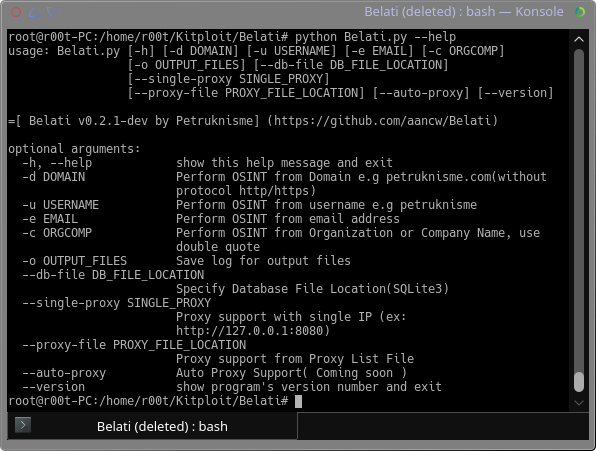
    python Belati.py --help

    Tested On
    Ubuntu 16.04 x86_64 Arch Linux x86_64 CentOS 7

    Python Requirements
    This tool not compatible with Python 3. So use python v2.7 instead!

    Why Need Root Privilege?
    Nmap need Root Privilege. You can add sudo or other way to run nmap without root privilege. It's your choice ;)
    Reference -> https://secwiki.org/w/Running_nmap_as_an_unprivileged_user
    Don't worry. Belati still running when you are run with normal user ;)

    Dependencies
    • urllib2
    • dnspython
    • requests
    • argparse
    • texttable
    • python-geoip-geolite2
    • python-geoip
    • dnsknife
    • termcolor
    • colorama
    • validators
    • tqdm
    • tldextract
    • fake-useragent

    System Dependencies
    For CentOS/Fedora user, please install this:
    yum install gcc gmp gmp-devel python-devel

    Library
    • python-whois
    • Sublist3r
    • Subbrute
    • nmap
    • git
    • sqlite3

    Notice
    This tool is for educational purposes only. Any damage you make will not affect the author. Do It With Your Own Risk!

    Author
    Aan Wahyu a.k.a Petruknisme(https://petruknisme.com)


    SSLsplit - transparent SSL/TLS interception


    SSLsplit is a tool for man-in-the-middle attacks against SSL/TLS encrypted network connections. It is intended to be useful for network forensics, application security analysis and penetration testing.
    SSLsplit is designed to transparently terminate connections that are redirected to it using a network address translation engine. SSLsplit then terminates SSL/TLS and initiates a new SSL/TLS connection to the original destination address, while logging all data transmitted. Besides NAT based operation, SSLsplit also supports static destinations and using the server name indicated by SNI as upstream destination. SSLsplit is purely a transparent proxy and cannot act as a HTTP or SOCKS proxy configured in a browser.

    SSLsplit supports plain TCP, plain SSL, HTTP and HTTPS connections over both IPv4 and IPv6. SSLsplit fully supports Server Name Indication (SNI) and is able to work with RSA, DSA and ECDSA keys and DHE and ECDHE cipher suites. Depending on the version of OpenSSL built against, SSLsplit supports SSL 3.0, TLS 1.0, TLS 1.1 and TLS 1.2, and optionally SSL 2.0 as well.
    For SSL and HTTPS connections, SSLsplit generates and signs forged X509v3 certificates on-the-fly, mimicking the original server certificate's subject DN, subjectAltName extension and other characteristics. SSLsplit has the ability to use existing certificates of which the private key is available, instead of generating forged ones. SSLsplit supports NULL-prefix CN certificates but otherwise does not implement exploits against specific certificate verification vulnerabilities in SSL/TLS stacks.
    SSLsplit implements a number of defences against mechanisms which would normally prevent MitM attacks or make them more difficult. SSLsplit can deny OCSP requests in a generic way. For HTTP and HTTPS connections, SSLsplit removes response headers for HPKP in order to prevent public key pinning, for HSTS to allow the user to accept untrusted certificates, and Alternate Protocols to prevent switching to QUIC/SPDY. HTTP compression, encodings and keep-alive are disabled to make the logs more readable.
    As an experimental feature, SSLsplit supports STARTTLS and similar mechanisms, where a protocol starts on a plain text TCP connection and is later upgraded to SSL/TLS through protocol-specific means, such as the STARTTLS command in SMTP. SSLsplit supports generic upgrading of TCP connections to SSL.
    See the manual page sslsplit(1) for details on using SSLsplit and setting up the various NAT engines.

    Requirements
    SSLsplit depends on the OpenSSL and libevent 2.x libraries. The build depends on GNU make and a POSIX.2 environment in PATH . If available, pkg-config is used to locate and configure the dependencies. The optional unit tests depend on the check library.
    SSLsplit currently supports the following operating systems and NAT mechanisms:
    • FreeBSD: pf rdr and divert-to, ipfw fwd, ipfilter rdr
    • OpenBSD: pf rdr-to and divert-to
    • Linux: netfilter REDIRECT and TPROXY
    • Mac OS X: pf rdr and ipfw fwd
    Support for local process information ( -i ) is currently available on Mac OS X and FreeBSD.
    SSL/TLS features and compatibility greatly depend on the version of OpenSSL linked against; for optimal results, use a recent release of OpenSSL proper. OpenSSL forks like LibreSSL and BoringSSL may or may not work.

    Installation
    With OpenSSL, libevent 2.x, pkg-config and check available, run:
    make
    make test # optional unit tests
    make install # optional install
    Dependencies are autoconfigured using pkg-config. If dependencies are not picked up and fixing PKG_CONFIG_PATH does not help, you can specify their respective locations manually by setting OPENSSL_BASE , LIBEVENT_BASE and/or CHECK_BASE to the respective prefixes.
    You can override the default install prefix ( /usr/local ) by setting PREFIX . For more build options see GNUmakefile .


    IntelMQ - A solution for IT security teams for collecting and processing security feeds using a message queuing protocol


    IntelMQ is a solution for IT security teams (CERTs, CSIRTs, abuse departments,...) for collecting and processing security feeds (such as log files) using a message queuing protocol. It's a community driven initiative called IHAP (Incident Handling Automation Project) which was conceptually designed by European CERTs/CSIRTs during several InfoSec events. Its main goal is to give to incident responders an easy way to collect & process threat intelligence thus improving the incident handling processes of CERTs.

    IntelMQ's design was influenced by AbuseHelper , however it was re-written from scratch and aims at:
    • Reduce the complexity of system administration
    • Reduce the complexity of writing new bots for new data feeds
    • Reduce the probability of events lost in all process with persistence functionality (even system crash)
    • Use and improve the existing Data Harmonization Ontology
    • Use JSON format for all messages
    • Integration of the existing tools (AbuseHelper, CIF)
    • Provide easy way to store data into Log Collectors like ElasticSearch, Splunk, databases (such as PostgreSQL)
    • Provide easy way to create your own black-lists
    • Provide easy communication with other systems via HTTP RESTFUL API
    It follows the following basic meta-guidelines:
    • Don't break simplicity - KISS
    • Keep it open source - forever
    • Strive for perfection while keeping a deadline
    • Reduce complexity/avoid feature bloat
    • Embrace unit testing
    • Code readability: test with unexperienced programmers
    • Communicate clearly


    Table of Contents
    1. How to Install
    2. Developers Guide
    3. IntelMQ Manager
    4. Incident Handling Automation Project
    5. Data Harmonization
    6. How to Participate
    7. Licence


    How to Install


    Developers Guide


    IntelMQ Manager
    Check out this graphical tool and easily manage an IntelMQ system.


    Incident Handling Automation Project


    Data Harmonization
    IntelMQ use the Data Harmonization. Check the following document .


    How to participate

    Halcyon - IDE for Nmap Script (NSE) Development


    Halcyon is the first IDE specifically focused on Nmap Script (NSE) Development. This research idea was originated while writing custom Nmap Scripts for Enterprise Penetration Testing Scenarios. The existing challenge in developing Nmap Scripts (NSE) was the lack of a development environment that gives easiness in building custom scripts for real world scanning, at the same time fast enough to develop such custom scripts. Halcyon is free to use, java based application that comes with code intelligence, code builder, auto-completion, debugging and error correction options and also a bunch of other features like other development IDE(s) has. This research was started to give better development interface/environment to researchers and thus enhance the number of NSE writers in the information security community.

    Halcyon IDE can understand Nmap library as well as traditional LUA syntax. Possible repetitive codes such as web crawling, bruteforcing etc., is pre-built in the IDE and this makes easy for script writers to save their time while developing majority of test scenarios.

    More documentation and presentation can be available on the official website http://halcyon-ide.org/


    dirsearch - Brute Force Directories and Files in Websites


    dirsearch is a simple command line tool designed to brute force directories and files in websites.

    Operating Systems supported
    • Windows XP/7/8/10
    • GNU/Linux
    • MacOSX

    Features
    • Multithreaded
    • Keep alive connections
    • Support for multiple extensions (-e|--extensions asp,php)
    • Reporting (plain text, JSON)
    • Heuristically detects invalid web pages
    • Recursive brute forcing
    • HTTP proxy support
    • User agent randomization
    • Batch processing

    About wordlists
    Dictionaries must be text files. Each line will be processed as such, except that the special word %EXT% is used, which will generate one entry for each extension (-e | --extension) passed as an argument.
    Example:
    • example/
    • example.%EXT%
    Passing the extensions "asp" and "aspx" will generate the following dictionary:
    • example/
    • example.asp
    • example.aspx
    You can also use -f | --force-extensions switch to append extensions to every word in the wordlists (like DirBuster).

    Changelog
    • 0.3.7 - 2016.08.22 Force extensions switch added.
    • 0.3.6 - 2016.02.14 Bugfixes
    • 0.3.5 - 2016.01.29 Improved heuristic, replaced urllib3 for requests, error logs, batch reports, user agent randomization, bugfixes
    • 0.3.0 - 2015.02.05 Fixed issue3, fixed timeout exception, ported to Python3, other bugfixes
    • 0.2.7 - 2014.11.21 Added Url List feature (-L). Changed output. Minor Fixes
    • 0.2.6 - 2014.9.12 Fixed bug when dictionary size is greater than threads count. Fixed URL encoding bug (issue2).
    • 0.2.5 - 2014.9.2 Shows Content-Length in output and reports, added default.conf file (for setting defaults) and report auto save feature added.
    • 0.2.4 - 2014.7.17 Added Windows support, --scan-subdir|--scan-subdirs argument added, --exclude-subdir|--exclude-subdirs added, --header argument added, dirbuster dictionaries added, fixed some concurrency bugs, MVC refactoring
    • 0.2.3 - 2014.7.7 Fixed some bugs, minor refactorings, exclude status switch, "pause/next directory" feature, changed help structure, expaded default dictionary
    • 0.2.2 - 2014.7.2 Fixed some bugs, showing percentage of tested paths and added report generation feature
    • 0.2.1 - 2014.5.1 Fixed some bugs and added recursive option
    • 0.2.0 - 2014.1.31 Initial public release


    MTR - A Network Diagnostic Tool


    MTR combines the functionality of the 'traceroute' and 'ping' programs in a single network diagnostic tool.

    As mtr starts, it investigates the network connection between the host mtr runs on and a user-specified destination host. After it determines the address of each network hop between the machines, it sends a sequence ICMP ECHO requests to each one to determine the quality of the link to each machine. As it does this, it prints running statistics about each machine. For a preview take a look at the screenshots.

    MTR screenshots

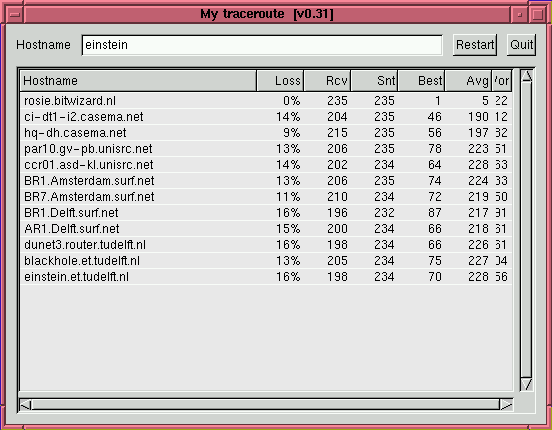
    Here is the "graphical" version. It opens a window of its own, and you can change the target host by typing in the input box at the top.


    Here is the "text" verison. It runs in the terminal window that you start it from.


    Compatibility

    Mtr uses autoconf. This should allow compatibility with a large range of operating systems. Feel free to report problems. We can then try to iron them out.
    I don't have much experience in using autoconf. Therefore I'm eager to learn more about it, as it seems a very useful tool. I've been editing small sections of the autoconf files, but I welcome suggestions on how to do things better. There usually IS a way to do it better....

    Compiling MTR

    Compiling mtr should be as easy as "make". If it is harder for you, your computer is misconfigured, or there is a problem with mtr that we should take care of. Please report this kind of problems.

    Binary distributions

    Ryan's build and/or mirror apparenltly stopped working somewhere in 1999, 14 years ago and nobody noticed. Apparently not worth maintaining.
    kanedaaa has packages up to slackware 12.1, also a while ago. Possibly because mtr is included in the distribution.
    The debian distribution has mtr builtin, so it would be preferrable to just use that.
    The freebsd ports link still works and has a reasonably recent version.
    If you want to contribute binaries in a way similar to this, feel free to volunteer.

    Live on the web

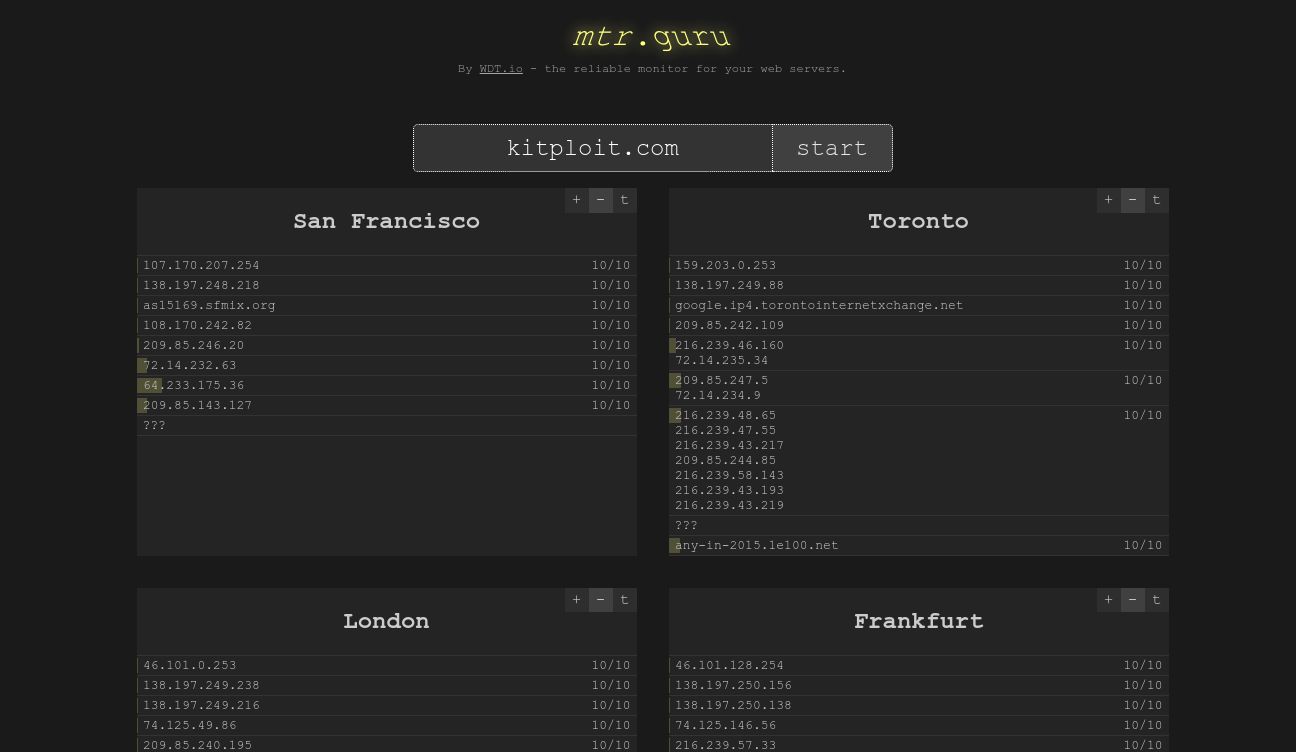
    Christian Pekeler has setup a web-frontend for running mtr from six (or maybe more by now) different places around the globe on mtr.guru .

    This is great for figuring out if your server is really down or just unreachable from part of the world. Of course, if all of Christian's servers can reach your target, that doesn't guarantee that it is reachable from everywhere, but it does make it clear that a possible problem is not "near" your server network-wise.


    ScratchABit - Easily retargetable and hackable interactive disassembler with IDAPython-compatible plugin API


    ScratchABit is an interactive incremental disassembler with data/control flow analysis capabilities. ScratchABit is dedicated to the efforts of the OpenSource reverse engineering community (reverse engineering to produce OpenSource drivers/firmware for hardware not properly supported by vendors).
    ScratchABit supports well-known in the community IDAPython API to write disassembly/extension modules.
    ScratchABit is a work in progress, features are added on as needed basis, contributions are welcome.
    ScratchABit is released under the terms of GNU General Public License v3 (GPLv3).

    Requirements/manifesto
    1. Should not be written in an obfuscated language. These includes languages which are too low-level, which allow to access non-initialized variables, which don't differentiate between variables and functions/procedures, which start array indexes from arbitrary numbers, etc., etc. ScratchABit is written in Python (modern version, Python3) for your pleasure and sanity.
    2. User interface framework should allow user interaction of the needed level, not add dependencies, bloat, issues, and incompatibilities between framework's versions. ScratchABit currently uses simple (no color even) full-screen text user interface, using ANSI/VT100 terminal escape sequences (yes, even curses library was deemed too bloat a dependency to force upon users).
    3. Should leverage easy to use text formats to store "database", to facilitate easy reuse and tool writing, and storage in version control systems.

    Quick start
    To use ScratchABit, you need Python3 installed and VT100 (minimum) or XTerm (recommended) terminal or terminal emulator (any Unix system should be compliant, like Linux/BSD/etc., see FAQ below for more).
    Clone the code using:
    git clone --recursive https://github.com/pfalcon/ScratchABit
    If you cloned code without --recursive , run git submodule update --init .
    If you want to disassemble a file in self-describing executable format (like ELF), just pass it as an argument to ScratchABit.py . The repository includes example-elf (x86 32bit) for quick start:
    python3 ScratchABit.py example-elf
    Alternatively, if you want to disassemble a raw binary file, you need to create a .def (definition) file, to specify what memory areas are defined for the code, at which address to load binary file, etc. (Note: a .def file may be useful for .elf and similar files too.) The repository includes a simple x86_64 raw binary code, and the corresponding .def file:
    python3 ScratchABit.py example.def
    Press F1 if in doubt what to do next (ScratchABit works similarly to other interactive dissamblers; some previous experience or background reading may be helpful). Press F9 to access menus (mouse works too in XTerm-compatible terminals).

    Using Plugins
    IDAPython processor plugins can be loaded from anywhere on the Python module path. Alternatively, you can symlink the plugin .py file into the plugins/cpu/ subdirectory.
    After the plugin is made available, create a new definition file based on example.def that sets the plugin module name in the cpu xxx line.
    For a very simple example that uses an external plugin, see this esp8266.def file that works with the xtensa.py plugin from the ida-xtensa2 repository .

    TODO/Things to decide
    • Currently uses multiple files for "database", each storing particular type of information. Switch to a single YAML file instead?
    • Add color (low priority, (unbloated!) patches welcome).
    • Few important UI commands to implement yet for comfortable work. ( All the most important commands should be there, other functionality is expected to be implemented using plugins).
    • Offer to save DB on quit if modified.
    • Git integration for DB saving.
    • Improve robustness (add exception handler at the main loop level, don't abort the application, show to user/log and continue).
    • Try to deal with code flow inconsistencies (e.g. within an instruction
      • low priority for intended usage) and data access inconsistencies (e.g. accessing individual bytes of previosly detected word - higher priority). (Improved in 1.4.)
    • See how to support other types of IDAPython plugins besides just processor modules.
    • Parse and use debugging information (e.g. DWARF) present in ELF (etc.) files.

    FAQ
    Q: What processors/architectures are supported?
    A: ScratchABit doesn't support any processor architectures on its own, it is fully retargettable using IDAPython API plugins. Many plugins are available, writing a new plugin is easy. To let users test-drive ScratchABit, a very simple (!) X86 processor plugin is included in the distribution, using Pymsasid disassembler under the hood.
    Q: I'm not on Linux, how can I run ScratchABit?
    A: Install Linux in an emulator/VM on your system and rejoice.


    autovpn - Easily connect to a VPN in a country of your choice


    autovpn is a tool to automatically connect you to a random VPN in a country of your choice. It uses openvpn to connect you to a server obtained from VPN Gate.

    Compiling
    First clone the repo and cd into the directory:
    $ git clone https://github.com/adtac/autovpn
    $ cd autovpn
    Then run this to generate the executable:
    $ go build autovpn.go
    It's Go. What do you expect?

    Requirements
    This requires openvpn . To install this on a yum -based distro:
    $ sudo dnf install openvpn
    If you're on a apt -based distro:
    $ sudo apt-get install openvpn
    Tested and works on Fedora 23. Dunno about Windows. Patches welcome.

    Usage
    Simply run:
    $ ./autovpn
    and you're done. You'll be connected to a server in the US. Welcome to the US!
    You can give a country if you want. For example, if you want to connect to a server in Japan:
    $ ./autovpn JP
    You may need superuser privileges. Don't worry, I'm not running rm -rf --no-preserve-root / underneath. It's for openvpn.