This is default featured slide 1 title

Go to Blogger edit html and find these sentences.Now replace these sentences with your own descriptions.

This is default featured slide 2 title

Go to Blogger edit html and find these sentences.Now replace these sentences with your own descriptions.

This is default featured slide 3 title

Go to Blogger edit html and find these sentences.Now replace these sentences with your own descriptions.

This is default featured slide 4 title

Go to Blogger edit html and find these sentences.Now replace these sentences with your own descriptions.

This is default featured slide 5 title

Go to Blogger edit html and find these sentences.Now replace these sentences with your own descriptions.

Showing posts with label SQL. Show all posts

RED HAWK - All In One Tool For Information Gathering, SQL Vulnerability Scannig and Crawling


RED HAWK is An All In One Tool For Information Gathering, SQL Vulnerability Scannig and Crawling. Coded In PHP.

Features Of The Tool:
  • Server detection
  • Cloudflare detector
  • robots scanner
  • CMS Detector
    • WordPress
    • Joomla
    • Drupal
    • Magento
  • Whois
  • GEO-IP Scan
  • NMAP Port Scan
  • DNS Lookup
  • SubNet Calculator
  • Subdomain Finder
  • Reverse IP Scanner
    • CMS detection For Sites On the same server.
  • Parameter Finder
    • Error based SQLi Detector
  • Crawler
    • Basic Crawler {69}
    • [ - ] Admin scanner
    • [ - ] Backups Finder
    • [ - ] Misc. Crawler
    • Advance Crawler{420}
    • [ - ] Admin scanner
    • [ - ] Backups Finder
    • [ - ] Misc. Crawler

Changelog:
  • Version 1.0.0
    • Initial Launch

Installation:
Run The Tool and Type fix This will Install All Required Modules.

Usage:
  • git clone https://github.com/Tuhinshubhra/RED_HAWK
  • cd RED_HAWK
  • php rhawk.php
  • Use the "help" command to see the command list or type in the domain name you want to scan (without Http:// OR Https://).
  • Select whether The Site Runs On HTTPS or not.
  • Leave The Rest To The Scanner

probeSniffer - A Tool for Sniffing Unencrypted Wireless Probe Requests from Devices


 ____  ____   ___  ____    ___ _________  ____ _____ _____  ___ ____    
| \| \ / \| \ / _/ ___| \| | | |/ _| \
| o | D | | o )/ [( \_| _ || || __| __/ [_| D )
| _/| /| O | | _\__ | | || || |_ | |_| _| /
| | | \| | O | [_/ \ | | || || _]| _| [_| \
| | | . | | | \ | | || || | | | | | . \
|__| |__|\_|\___/|_____|_____|\___|__|__|____|__| |__| |_____|__|\__|
v2.1 by David SchĂźtz (@xdavidhu)

A tool for sniffing unencrypted wireless probe requests from devices:

new in 2.1:
  • Displaying the number of hosts
  • Logging to SQLite database file
  • Settable nickname for mac addresses
  • Options to filter output by mac address
  • Capturing 'boradcast' probe requests (without ssid)

requirements:
  • Kali Linux / Raspbian with root privileges
  • Python3 & PIP3 (probeSniffer will install the dependenices)
  • A wireless card (capable for monitor mode) and one other internet connected interface (for vendor resolve)

options:
  • -d / do not show duplicate requests
  • -b / do not show broadcast requests
  • -f / only show requests from the specified mac address
  • --addnicks / add nicknames to mac addresses
  • --flushnicks / flush nickname database
  • --nosql / disable SQL logging completely
  • --debug / turn debug mode on
  • -h / display help menu

installing:

Kali Linux / Raspbian:
$ sudo apt-get update && sudo apt-get install python3 python3-pip -y

$ git clone https://github.com/xdavidhu/probeSniffer

$ cd probeSniffer/

$ python3 -m pip install -r requirements.txt
WARNING: probeSniffer is only compatible with Python 3.3 & 3.4 & 3.5 & 3.6

usage:
Make sure to put your interface into monitor mode before!
$ sudo python3 probeSniffer.py [monitor-mode-interface] [options]


explo - Human And Machine Readable Web Vulnerability Testing Format

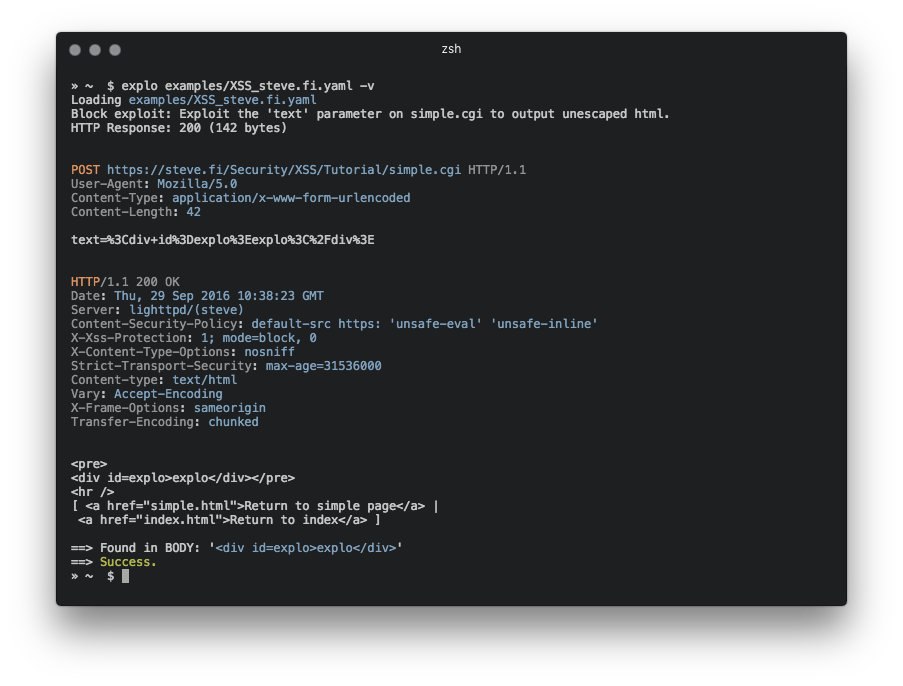
explo is a simple tool to describe web security issues in a human and machine readable format. By defining a request/condition workflow, explo is able to exploit security issues without the need of writing a script. This allows to share complex vulnerabilities in a simple readable and executable format.

Example for extracting a csrf token and using this in a form:
name: get_csrf
description: extract csrf token
module: http
parameter:
url: http://example.com/contact
method: GET
header:
user-agent: Mozilla/5.0
extract:
csrf: [CSS, "#csrf"]
---
name: exploit
description: exploits sql injection vulnerability with valid csrf token
module: http
parameter:
url: http://example.com/contact
method: POST
body:
csrf: "{{get_csrf.extracted.csrf}}"
username: "' SQL INJECTION"
find: You have an error in your SQL syntax


In this example definition file the security issue is tested by executing two steps which are run from top to bottom. The last step returns a success or failure, depending on the string 'You have an error in your SQL syntax' to be found.

Installation

Install via PyPI
pip install explo

Install via source
git clone https://github.com/dtag-dev-sec/explo
cd explo
python setup.py install

Usage
explo [--verbose|-v] testcase.yaml
explo [--verbose|-v] examples/*.yaml
There are a few example testcases in the examples/ folder.
$ explo examples/SQLI_simple_testphp.vulnweb.com.yaml
You can also include explo as a python lib:
from explo.core import from_content as explo_from_content
from explo.core import ExploException, ProxyException

def save_log(msg):
print(msg)

try:
result = explo_from_content(explo_yaml_file, save_log)
except ExploException as err:
print(err)

Modules
Modules can be added to improve functionality and classes of security issues.

http (basic)
The http modules allows to make a http request, extract content and search/verify content.
The following data is made available for following steps:
  • the http response body: stepname.response.content
  • the http response cookies: stepname.response.cookies
  • extracted content: response.extracted.variable_name
If a find_regex parameter is set, a regular expression match is executed on the response body. If this fails, this module returns a failure and thus stopping the executing of the current workflow (and all steps).
When extracting by regular expressions, use the match group extract to mark the value to extract (view below for an example).
For referencing cookies, reference the name of the previous step where cookies should be taken from (cookies: the_other_step.response.cookies).
Parameter examples:
parameter:
url: http://example.com
method: GET
allow_redirects: True
headers:
User-Agent: explo
Content-Type: abc
cookies: stepname.response.cookies
body:
key: value
find: search for string
find_regex: search for (reg|ular)expression
find_in_headers: searchstring in headers
extract:
variable1: [CSS, '#csrf']
variable2: [REGEX, '<input(.*?)value="(?P<extract>.*?)"']

http_header
The http header module allows to check if a response misses a specified set of headers (and values). All other parameters are identical to the http module.
The following data is made available for other modules:
  • the http response body: stepname.response.content
  • the http response cookies: stepname.response.cookies
Parameter examples:
parameter:
url: http://example.com
method: GET
allow_redirects: True
headers:
User-Agent: explo
Content-Type: abc
body:
key: value
headers_required:
X-XSS-Protection: 1
Server: . # all values are valid

sqli_blind
The sqli_blind module is able to identify time based blind sql injections.
The following data is made available for other modules:
  • the http response body: stepname.response.content
  • the http response cookies: stepname.response.cookies
Parameter examples:
parameter:
url: http://example.com/vulnerable.php?id=1' waitfor delay '00:00:5'--
method: GET
delay_seconds: 5
If the threshold of 5 seconds (delay_seconds) is exceeded, the check returns true (and thus resulting in a success).


Whitewidow - SQL Vulnerability Scanner

Whitewidow is an open source automated SQL vulnerability scanner, that is capable of running through a file list, or can scrape Google for potential vulnerable websites. It allows automatic file formatting, random user agents, IP addresses, server information, multiple SQL injection syntax, ability to launch sqlmap from the program, and a fun environment. This program was created for learning purposes, and is intended to teach users what vulnerability looks like.

Screenshots
Launching whitewidow displays the custom designed banner and begins searching for possible sites that could be vulnerable


Whitewidow is capable of finding vulnerabilities in websites by scraping Google using over 1,000 different queries that are carefully researched before added. It also uses multiple different SQL injection approaches


Whitewidow is also capable of spidering a single webpage for all available links, it will then search for vulnerabilities in all the links using the programs built in file feature


And when all is said and done, and you're sure that you've found some vulnerable sites, you can launch sqlmap from the program without the need of downloading another clone.


Basic Usage
ruby whitewidow.rb -d This will run whitewidow in default mode and scrape Google for possible sites using a random search query.
ruby whitewidow.rb -f path/to/file This will run whitewidow through a given file and add the SQL syntax to the URL.
ruby whitewidow.rb -h Will run the help flag along with show the help menu.
For more information about usage and more flags you can checkout the wiki functionality page here.

Dependencies
  • gem 'mechanize'
  • gem 'nokogiri'
  • gem 'rest-client'
  • gem 'webmock'
  • gem 'rspec'
  • gem 'vcr'
To install all gem dependencies, follow the following template:
cd whitewidow
bundle install
This should install all gems needed, and will allow you to run the program without trouble.


Operative Framework v1.0b - Fingerprint Framework


This is a framework based on fingerprint action, this tool is used for get information on a website or a enterprise target with multiple modules (Viadeo search, Linkedin search, Reverse email whois, Reverse ip whois, SQL file forensics ...)

Dependency & launching
  • pip install -r requirements.txt
  • python operative.py

Youtube

Campaign
  • You can start a (gathering/fingerprinting) campaign with :campaign command.
  • Update a value of YOURWEBSITE.COM / ENTERPRISE_NAME in config.json file.
  • You can add a module process for a customized campaign.

Core Modules
  • core/modules/cms_gathering
  • core/modules/domain_search
  • core/modules/email_to_domain
  • core/modules/https_gathering
  • core/modules/linkedin_search
  • core/modules/reverse_ipdomain
  • core/modules/search_db
  • core/modules/waf_gathering
  • core/modules/whois_domain
  • core/modules/generate_email
  • core/modules/viadeo_search
  • core/modules/file_common
  • core/modules/get_websiteurl
  • core/modules/getform_data
  • core/modules/subdomain_search
  • core/modules/vhost_IPchecker
  • core/modules/tools_suggester
  • core/modules/metatag_look
  • core/modules/header_retrieval

SQL File forensics
  • import database in core/dbs/
  • read table
  • read columns
  • search information with pattern

Write module
For write module look core/modules/sample_module class


Blindy - Simple Script for running BruteForce Blind MySql Injection


Simple script for running bruteforce blind MySql injection
The script will run through queries listed in sets in provided file (default-queries.json as default) and try to bruteforce places with {} placeholder. If no {} placeholder present, the script will simply make request with current query.

command line
$ python3 blindy.py --help
usage: blindy.py [-h] [-f filename] [-m method] -p name -r regexp -u url
[-s set_of_queries]

Run blind sql injection using brutforce

optional arguments:
-h, --help show this help message and exit
-f filename File name for your commands in json format, defaults
to default-queries.json
-m method, --method method
Where to inject (GET - get parameter/default, POST -
post parameter, HEADER - header)
-p name Name of parameter (for get - param name, post - param
name, for header - name of header). If params need to
have fixed value use -p submit=true
-r regexp Regular expression for negative pattern (script search
for the pattern and if present - will consider that
injection failed and igrone result.)
-u url Url to test
-s set_of_queries, --set set_of_queries
Which set of queries to analyze from json file, for
ex. login, blind. Default to blind.

Example usage
Bruteforce inject into POST query_param
python3 blindy.py -m POST -p query_param -p submit=1 -r 'Pattern\ to\ ignore\ result' -u http://example.com/index.php -s blind
Bruteforce inject into POST query_param with placeholder
python3 blindy.py -m POST -p "query_param=login {}" -p submit=1 -r 'Pattern\ to\ ignore\ result' -u http://example.com/index.php -s blind
This will inject the queries in a place of {} parameter placeholder
Simple check a list of queries against username parameter
python3 blindy.py -m POST -p username -p submit=1 -r 'Pattern\ to\ ignore\ result' -u http://example.com/login.php -s login


DBShield - Database Firewall Written In Go

Protects your data by inspecting incoming queries from your application server and rejecting abnormal ones.

How it works?
For example, this is how web server normally interacts with database server:


By adding DBShield in front of database server we can protect it against abnormal queries. To detect abnormal queries we first run DBShield in learning mode. Learning mode lets any query pass but it records information about it (pattern, username, time and source) into the internal database.


After collecting enough patterns we can run DBShield in protect mode. Protect mode can distinguish abnormal query pattern, user and source and take action based on configurations.


Demo
For demo, we are using sqlmap(automatic SQL injection and database takeover tool) to exploit the SQL injection vulnerability at user.php
In the first scenario, the sqlmap successfully exploits the SQL injection when web application connected directly to the database(MySQL), In the second scenario, we modify the user.php so DBShield gets between the web application and database which will drop the injection attempt and make sqlmap fail.


Sample Outputs
CLI
$ go run main.go
2016/10/15 16:25:31 [INFO] Config file: /etc/dbshield.yml
2016/10/15 16:25:31 [INFO] Internal DB: /tmp/model/10.0.0.21_postgres.db
2016/10/15 16:25:31 [INFO] Listening: 0.0.0.0:5000
2016/10/15 16:25:31 [INFO] Backend: postgres (10.0.0.21:5432)
2016/10/15 16:25:31 [INFO] Protect: true
2016/10/15 16:25:31 [INFO] Web interface on https://127.0.0.1:8070/
2016/10/15 16:25:33 [INFO] Connected from: 10.0.0.20:35910
2016/10/15 16:25:33 [INFO] Connected to: 10.0.0.21:5432
2016/10/15 16:25:33 [INFO] SSL connection
2016/10/15 16:25:34 [DEBUG] Client handshake done
2016/10/15 16:25:34 [DEBUG] Server handshake done
2016/10/15 16:25:34 [INFO] User: postgres
2016/10/15 16:25:34 [INFO] Database: test
2016/10/15 16:25:34 [INFO] Query: SELECT * FROM stocks where id=-1 or 1=1
2016/10/15 16:25:34 [WARN] Pattern not found: [53 55 51 52 55 52 50 53 55 51 53 49 115 116 111 99 107 115 53 55 51 53 50 105 100 54 49 52 53 53 55 51 55 57 53 55 52 48 52 53 55 51 55 57 54 49 53 55 51 55 57] (SELECT * FROM stocks where id=-1 or 1=1)
2016/10/15 16:25:34 [WARN] Dropping connection

Web Interface


Installation
Get it
$ go get -u github.com/nim4/DBShield
Then you can see help using "-h" argument:
$ $GOPATH/bin/DBShield -h
DBShield 1.0.0-beta3
Usage of DBShield:
-a get list of abnormal queries
-c file
config file (default "/etc/dbshield.yml")
-h show help
-k show parsed config and exit
-l get list of captured patterns
-version
show version
and run it with your configuration, like:
$ $GOPATH/bin/DBShield -c config.yml
see sample configuration file

Supports:
Database Protect SSL
DB2 Yes No
MariaDB Yes Yes
MySQL Yes Yes
Oracle Yes No
Postgres Yes Yes

[SQLSentinel] OpenSource tool for sql injection security testing


SQLSentinel is an opensource tool that automates the process of finding the sql injection on a website. SQLSentinel includes a spider web and sql errors finder. You give in input a site and SQLSentinel crawls and try to exploit parameters validation error for you. When job is finished, it can generate a pdf report which contains the url vuln found and the url crawled. 

Please remember that SQLSentinel is not an exploiting tool. It can only finds url Vulnerabilities.


[SQL Fingerprint] Christmas Release


Microsoft SQL Server fingerprinting can be a time consuming process, because it involves trial and error methods to determine the exact version. Intentionally inserting an invalid input to obtain a typical error message or using certain alphabets that are unique for certain server are two of the many ways to possibly determine the version, but most of them require authentication, permissions and/or privileges on Microsoft SQL Server to succeed. 

Instead, ESF.pl uses a combination of crafted packets for SQL Server Resolution Protocol (SSRP) and Tabular Data Stream Protocol (TDS) (protocols natively used by Microsoft SQL Server) to accurately perform version fingerprinting and determine the exact Microsoft SQL Server version. ESF.pl also applies a sophisticated Scoring Algorithm Mechanism (Powered by Exploit Next Generation++ Technology), which is a much more reliable technique to determine the Microsoft SQL Server version. It is a tool intended to be used by: 


This version is a completely rewritten version in Perl, making ESF.pl much more portable than the previous binary

version (Win32), and its original purpose is to be used as a tool to perform automated penetration test. This version also includes the followingMicrosoft SQL Server versions to its fingerprint database:  

        • Microsoft SQL Server 2012 SP1 (CU1)
• Microsoft SQL Server 2012 SP1
• Microsoft SQL Server 2012 SP1 CTP4
• Microsoft SQL Server 2012 SP1 CTP3
• Microsoft SQL Server 2012 SP0 (CU4)
• Microsoft SQL Server 2012 SP0 (MS12-070)
• Microsoft SQL Server 2012 SP0 (CU3)
• Microsoft SQL Server 2012 SP0 (CU2)
• Microsoft SQL Server 2012 SP0 (CU1)
• Microsoft SQL Server 2012 SP0 (MS12-070)
• Microsoft SQL Server 2012 SP0 (KB2685308)
• Microsoft SQL Server 2012 RTM

Download: http://code.google.com
Source: http://adf.ly/146C04